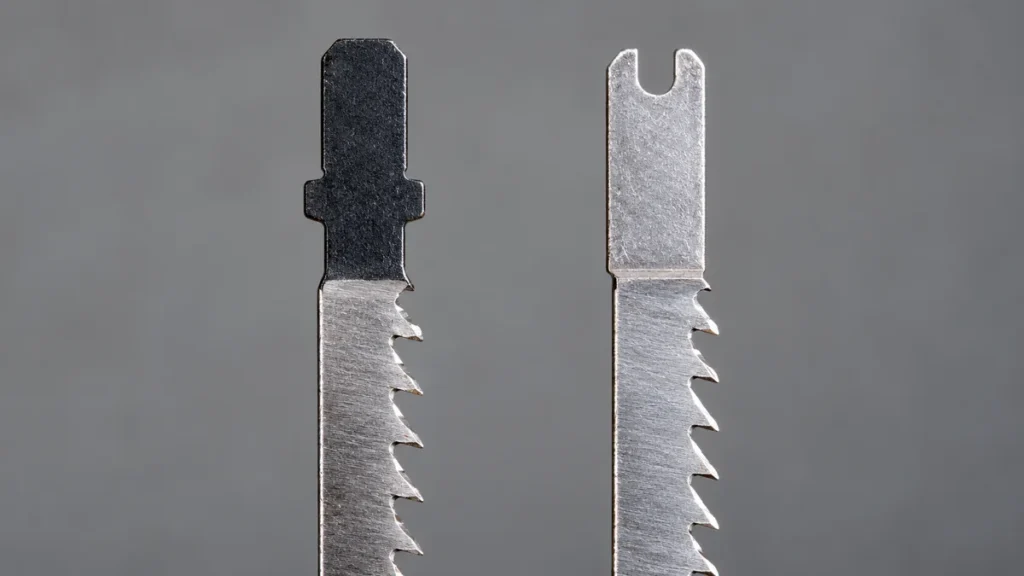
T-Shank and U-Shank jigsaw blades use different interfaces for attaching the blade to the saw. A T-Shank has lateral tabs near the top that engage with a compatible blade clamp. A U-Shank has a U-shaped cutout at its upper end and is commonly associated with older screw-type or set-screw clamps. Neither interface is inherently better at cutting. The correct choice is the one specified for the jigsaw’s blade-clamping mechanism.
T-Shank blades are common on newer jigsaws, particularly models with tool-free blade-release systems. U-Shank blades remain available for older saws and certain clamps that specifically accept them. Some jigsaws can accept both styles, but this capability must be confirmed in the owner’s manual. A blade that appears to enter the clamp is not necessarily compatible or securely retained.
Once you have confirmed that your saw accepts T-shank blades, compare T-shank blade options by material and cutting profile.
T-Shank and U-Shank Blades at a Glance
| Feature | T-Shank | U-Shank |
|---|---|---|
| Shank shape | Tabs or shoulders near the top create a T-like profile | U-shaped cutout at the upper end |
| Common clamp type | Frequently used with tool-free or quick-release clamps | Frequently used with screw-type or set-screw clamps |
| Typical tool generation | Common on newer jigsaw designs | Common on many older jigsaw designs |
| Blade changes | Often possible without a separate tool, depending on the saw | May require a hex key, screwdriver, or another specified tool |
| Interchangeability | Fits only a clamp documented as T-Shank compatible | Fits only a clamp documented as U-Shank compatible |
| Effect on cutting performance | The interface secures the blade. Cut quality depends more directly on blade construction, tooth design, dimensions, condition, and operating technique. | |
How the Two Shank Designs Differ
T-Shank Geometry
A T-Shank blade has two projections near the upper end. A compatible blade clamp captures these features to retain and position the blade. The exact internal clamp mechanism varies among jigsaw models, so two T-Shank-compatible saws may use different release levers, collars, or insertion procedures.
Many current jigsaws pair this interface with a tool-free blade-changing system. That arrangement can make blade changes faster, but tool-free operation is a feature of the jigsaw’s clamp rather than a guarantee created by the blade alone. Installation directions still depend on the specific model.
U-Shank Geometry
A U-Shank blade has a curved slot cut into its upper end. On many older jigsaws, one or more screws secure the shank inside the blade holder. Clamp designs vary, and some require the blade to be positioned against a stop or aligned with a blade guide roller before the fastener is tightened.
U-Shank blades are sometimes labeled “universal shank.” That label should not be interpreted as universal compatibility. Many T-Shank-only clamps cannot retain a U-Shank blade, and some U-Shank clamps have specific dimensional or installation requirements.
If the manual specifies a U-shank holder, compare U-shank replacement blades rather than forcing a T-shank blade into the clamp.
Compatibility Is the Deciding Factor
The jigsaw’s blade holder determines which shank can be used safely. Corded and cordless power sources do not establish blade compatibility. A cordless jigsaw may use either interface depending on its design, although T-Shank clamps are prevalent among newer models.
Use the following checks before selecting a replacement blade:
- Identify the exact jigsaw model. Similar-looking saws from one manufacturer may use different blade clamps.
- Read the blade compatibility section of the manual. Look for an explicit reference to T-Shank, U-Shank, or acceptance of both.
- Inspect the existing blade only as a secondary check. An old blade can help identify the interface, but it may be the wrong blade previously installed by another user.
- Check the clamp itself. Look for damage, missing fasteners, packed debris, or a release mechanism that does not return to its locked position.
- Confirm application suitability. After establishing shank compatibility, select a blade intended for the workpiece material, thickness, and required cut.
A dual-acceptance or multi-purpose clamp may support both shank styles, but that feature cannot be inferred from the opening in the blade holder. Manufacturer documentation takes precedence over packaging terms or visual fit.
Does T-Shank Cut Better Than U-Shank?
The shank primarily affects attachment. It does not establish tooth sharpness, blade stiffness, heat resistance, usable cutting length, or suitability for a particular material. Two blades with different shanks could perform similarly if their cutting sections and construction were otherwise comparable and each was correctly secured in a compatible saw.
Factors with a more direct effect on cutting behavior include:
- Blade material: HCS, HSS, bi-metal, carbide-tipped, and carbide-grit constructions serve different applications.
- Tooth geometry: Tooth pitch, set, shape, and cutting direction affect speed, chip removal, and edge quality.
- Blade width: Narrow blades are often selected for curves, while wider blades can offer more directional stability where the application permits.
- Blade thickness and stiffness: A more rigid blade may resist deflection better, though material thickness, feed pressure, and saw condition remain relevant.
- Working length: The blade needs enough usable length and clearance to remain through the workpiece across its full stroke.
- Blade condition: Worn, bent, cracked, or heat-damaged blades can cut poorly regardless of shank type.
- Operating technique: Excessive feed pressure can cause wandering or deflection, particularly in thick material and tight curves.
A conversion from U-Shank to T-Shank will not automatically create a cleaner or straighter cut. Any improvement may instead result from using a newer blade with more suitable teeth, dimensions, or construction.
Tool-Free Clamps and Screw-Type Clamps
T-Shank systems are frequently associated with tool-free blade changes. Depending on the jigsaw, the user may rotate a collar, move a lever, or operate another release mechanism. Some clamps eject the blade, while others release it without ejection. A recently used blade may be hot, so it should be allowed to cool before handling.
Many U-Shank systems use a screw or set screw to press the blade against part of the holder. Such systems may require a screwdriver or hex key. Tightening methods and fastener arrangements differ, which makes a universal installation procedure unreliable.
Clamp style should not be assumed from blade shape alone. Follow the manual for insertion depth, orientation, fastener tightening, guide-roller placement, and confirmation that the blade is locked.
How to Replace the Blade Safely
The exact mechanism varies, but the following general sequence applies to many jigsaws:
- Switch off the jigsaw and wait for all movement to stop.
- Unplug a corded model or remove the battery from a cordless model if the manufacturer instructs users to do so before blade changes.
- Allow a hot blade to cool. Avoid gripping the teeth with bare hands.
- Operate the specified release mechanism or loosen the blade-clamp fastener as directed in the manual.
- Remove the old blade and inspect the clamp for debris or visible damage.
- Insert a compatible replacement blade in the required orientation and to the specified depth.
- Lock the mechanism or tighten the fastener according to the manufacturer’s procedure.
- Confirm that the blade is retained and correctly positioned relative to the guide roller, where the design uses one.
- Check that the blade has sufficient clearance beneath the workpiece before restoring power.
Do not grind, file, drill, or bend a blade shank to make it fit another clamp. Altering the interface can prevent secure retention and damage the blade holder. An adapter should be used only if the jigsaw manufacturer explicitly documents it for that model.
After confirming the shank, follow the steps for changing the blade safely.
Select the Cutting Section After Confirming the Shank
Finding the correct interface completes only the first part of blade selection. The cutting section must suit the job. A compatible wood blade may be inappropriate for metal, while a fine-tooth metal blade may cut wood slowly or clear chips poorly.
Match the Blade to the Material
Read the blade manufacturer’s application information for wood, plywood, laminate, plastic, steel, stainless steel, aluminum, or other materials. A broad “metal” label does not establish suitability for every metal or thickness. Likewise, blades intended for clean wood cuts may differ from blades made for fast rough cutting or tight curves.
Check Working Length and Clearance
Total blade length is different from usable cutting length. The toothed working section must pass through the workpiece throughout the jigsaw’s complete stroke, with adequate clearance below it. The saw’s maximum stated capacity also does not make every compatible blade suitable for that thickness.
Choose Tooth Geometry for the Required Result
More teeth per inch do not automatically produce the best result in every material. Tooth pitch must be appropriate for the workpiece type and thickness. Tooth direction also influences cutting action and which surface may be more vulnerable to tear-out. Follow the application range stated for the individual blade rather than relying on one TPI rule.
What to Do If the Correct Blade Will Not Lock
Stop and disconnect the tool from its power source before inspecting the clamp. A compatible blade that will not seat or remain locked may indicate:
- Debris inside the blade holder
- A blade inserted in the wrong orientation
- Incomplete operation of the release lever or collar
- A loose or damaged clamp fastener
- A bent or damaged blade shank
- Wear or damage inside the blade-clamping mechanism
- A blade that is labeled correctly by category but does not meet the tool’s documented dimensional requirements
Do not run the jigsaw with a loose blade. If cleaning and correct installation do not resolve the issue, consult the manufacturer’s service information or seek qualified repair assistance. Bypassing the clamp, adding improvised packing material, or modifying the shank can create an insecure connection.
Frequently Asked Questions
Can a T-Shank Blade Fit a U-Shank Jigsaw?
Only if the jigsaw’s documentation states that its clamp accepts T-Shank blades. Some older or multi-purpose holders accept more than one interface, while a U-Shank-only holder may not secure a T-Shank correctly. Physical insertion by itself does not confirm compatibility.
Can a U-Shank Blade Be Used in a T-Shank Clamp?
Usually not in a T-Shank-only clamp. The U-shaped end lacks the lateral features that a dedicated T-Shank mechanism is intended to capture. Check the exact model documentation before attempting installation.
Are All T-Shank Blades Interchangeable?
No. Sharing a general shank category does not guarantee compatibility with every jigsaw or suitability for every cut. The blade must meet the tool manufacturer’s interface requirements and have the correct material rating, dimensions, and tooth design for the application.
Should an Older U-Shank Jigsaw Be Replaced?
The shank style alone is not a reason to replace a functioning jigsaw. Continued use depends on the tool’s condition, safe operation, availability of compatible blades, and ability to perform the required work. Damaged cords, faulty switches, worn clamps, or other mechanical problems require appropriate inspection and service.
Why Are T-Shank Blades More Common on Newer Jigsaws?
The interface works with many quick-release clamp designs, making tool-free blade changes practical. This convenience and broad adoption have made T-Shank blades common in newer systems. It does not mean the shank itself cuts faster, straighter, or cleaner.
The Practical Choice
For T-Shank vs. U-Shank jigsaw blades, compatibility settles the first decision. Use a T-Shank blade in a jigsaw documented for T-Shank blades and a U-Shank blade in a model documented for U-Shank blades. If the tool accepts both, either interface may be usable under the manufacturer’s instructions.
Once the interface is confirmed, focus on the cutting characteristics that affect the job: blade construction, tooth geometry, width, stiffness, working length, and material rating. Secure installation matters more than the convenience or age associated with either shank design.
