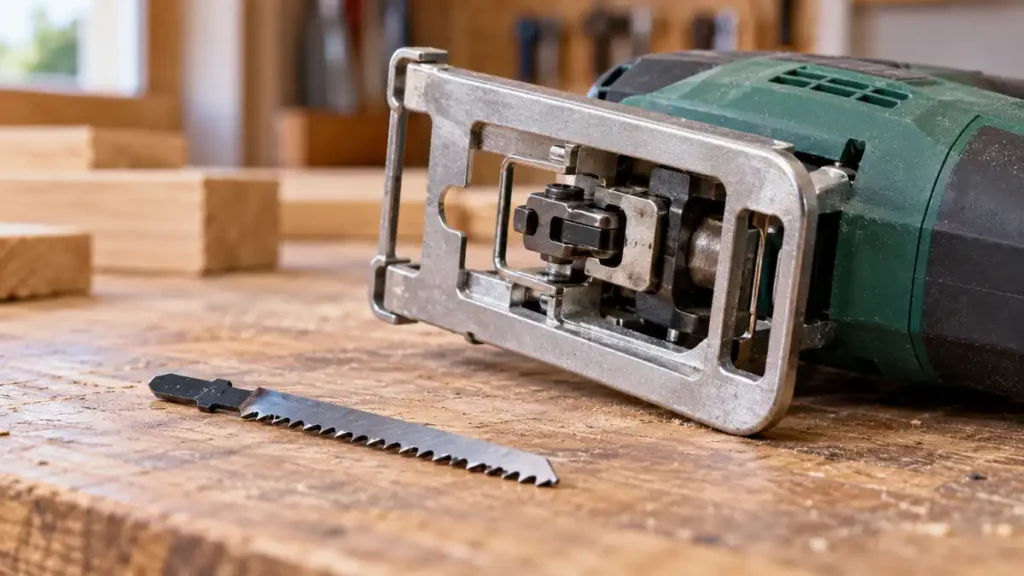
To change a jigsaw blade, disconnect the tool from its power source, allow the blade to cool, open the blade clamp, remove the old blade, and install a compatible replacement. Lock the clamp, then pull gently on the blade to confirm that it is secure. The exact release and locking method varies, so follow the jigsaw’s manual if its mechanism differs from the general procedure below.
Corded and cordless jigsaws require the same basic sequence, but they are disconnected differently. Unplug a corded model. Remove the battery from a cordless model. Never rely solely on the trigger lock or power switch while working near the blade.
If your saw accepts T-shank blades and you need replacements for several materials, compare these T-shank jigsaw blade sets before installing a new blade.
What You Need
- A replacement jigsaw blade with the correct shank and application rating
- The jigsaw’s supplied hex key, screwdriver, or wrench if it uses a screw-secured clamp
- A brush or dry cloth for removing loose debris
- The owner’s manual when the blade holder or release control is unfamiliar
Select the replacement before opening the clamp. A blade must fit the tool’s holder and suit the material being cut. A T-shank blade cannot be assumed to fit a U-shank holder, and physical fit does not establish proper compatibility.
How to Change a Jigsaw Blade Step by Step
-
Disconnect the power source.
Unplug a corded jigsaw or remove the battery from a cordless jigsaw. Place the tool on a stable surface where the trigger cannot be pressed accidentally.
-
Wait for the blade to stop and cool.
A blade can become hot during cutting. Let it cool before handling it. Avoid touching the teeth or gripping a hot blade through a thin cloth.
-
Identify the blade-clamp mechanism.
Look near the point where the blade enters the saw. The tool may have a lever, collar, sliding release, or one or more clamp screws. Do not force a control if its operation is unclear. Check the manual for the correct release direction and required tool.
-
Open the clamp and remove the old blade.
Hold the jigsaw so the blade points away from your face and body. Operate the release mechanism or loosen the specified clamp screw. Some tool-free holders can eject the blade when released, so keep the area in front of it clear. Pull the blade straight out if it does not release automatically.
-
Clean the blade-holder area.
Remove loose sawdust, chips, or residue with a brush or dry cloth. Debris inside or around the holder can interfere with full blade insertion. Do not probe the mechanism with the battery installed or the cord connected.
-
Insert the compatible replacement blade.
Open the clamp as required and push the blade shank fully into the holder. On a conventional jigsaw setup, the teeth usually face toward the front of the saw and the back edge aligns with the blade guide roller. Blade and holder designs vary, so verify the intended orientation in the tool and blade instructions.
-
Lock the blade in place.
Release the tool-free control so it returns completely to its locked position, or tighten the specified clamp screw according to the manual. Avoid makeshift fasteners and excessive tightening. A damaged screw, stripped thread, or release control that will not close requires correction before the saw is used.
-
Check that the blade is secured.
With the jigsaw still disconnected, pull gently on the blade. It should remain seated without slipping out. Confirm that it is straight, properly aligned with the guide roller where applicable, and clear of the baseplate through its visible travel path.
-
Restore power and perform a controlled check.
Reinstall the correct battery or reconnect the cord after moving your hands away from the blade. Keep the baseplate clear of surrounding objects and briefly run the tool according to its operating instructions. Stop immediately if the blade wobbles abnormally, slips, strikes the baseplate, or produces an unusual mechanical sound.
Identify the Blade-Clamp Type Before Opening It
Jigsaw blade holders do not share a universal release method. Recognizing the general clamp type helps prevent damage, but the manufacturer’s instructions remain the authority for a particular model.
| Clamp Type | Typical Operation | Key Precaution |
|---|---|---|
| Lever or sliding tool-free release | A lever or slider opens the holder so the blade can be removed or inserted. | Some mechanisms are spring-loaded and may eject the blade. |
| Rotating collar | A collar near the blade holder rotates to release and lock the blade. | Do not use pliers unless the manufacturer specifically directs it. |
| Screw-secured clamp | A screw is loosened with the specified hex key, screwdriver, or wrench. | Use the correct tool and follow the documented tightening procedure. |
| Manufacturer-specific holder | The release sequence depends on the model. | Consult the manual rather than forcing an unfamiliar part. |
Confirm T-Shank or U-Shank Compatibility
The shank is the upper portion of the blade that enters the clamp. T-shank blades have side projections near the top that create a T-shaped profile. U-shank blades have a U-shaped end and may include a retaining hole, depending on the design.
Many newer jigsaws use T-shank blades and tool-free holders, but that pattern is not universal. Some older or manufacturer-specific jigsaws use U-shank blades or screw clamps. A few holders may accept more than one interface, but compatibility must be confirmed from the exact tool documentation.
Never grind, drill, bend, or otherwise modify a blade shank to fit. The replacement blade also needs suitable construction, tooth geometry, dimensions, and working length for the intended material. Shank compatibility addresses attachment. It does not determine whether the blade is suitable for wood, metal, laminate, plastic, or another material.
Use the comparison for identifying T-shank and U-shank blades before trying another blade in the holder.
How to Confirm Correct Blade Installation
A correctly installed blade should satisfy all of the following checks before cutting:
- The shank is inserted to the depth required by the blade holder.
- The clamp has returned fully to its locked position or its fastener is properly secured.
- A gentle pull does not remove the blade.
- The blade faces the direction specified by the manufacturer.
- The back edge engages or aligns with the guide roller where the design requires it.
- The blade is not visibly twisted, bent, cracked, or missing teeth.
- The blade clears the baseplate and other components.
- The blade has enough usable length to pass through the workpiece throughout the full stroke.
Total blade length and usable cutting length are different measurements. The blade must extend beyond the bottom of the material throughout its movement. Follow the blade and jigsaw documentation rather than estimating suitability from overall length alone.
What to Do If the Blade Will Not Release
First, confirm that power is disconnected and the blade has cooled. Then inspect the holder for compacted sawdust, metal chips, corrosion, or a release control that has not reached its fully open position.
For a screw-secured clamp, use the correct key or driver. A rounded fastener or stripped holder should be serviced rather than forced. For a tool-free clamp, do not pry the holder open or apply excessive force with pliers. Check the manual for the correct movement and blade-removal sequence.
A bent or broken blade can leave part of its shank inside the holder. Do not reconnect power to shake it loose. Follow the manufacturer’s removal instructions or seek qualified repair assistance if the fragment cannot be removed without dismantling the tool.
What to Do If the New Blade Will Not Lock
A blade that will not seat or remain locked usually points to one of these issues:
- The shank type is incompatible with the blade holder.
- The blade has not been inserted fully.
- Sawdust or chips are obstructing the clamp.
- The release lever or collar has not returned to its locked position.
- The blade shank is bent, damaged, or improperly manufactured.
- A clamp screw, spring, or internal holder component is worn or damaged.
Do not operate the jigsaw if the blade can be pulled out easily, sits at an unusual angle, or moves independently of the holder. Trying another verified compatible blade can help distinguish a damaged blade from a clamp problem. Persistent holder problems require service according to the manufacturer’s guidance.
When a Jigsaw Blade Should Be Replaced
Replace a blade when it has visible cracks, a bent shank, damaged teeth, severe wear, or heat discoloration accompanied by poor cutting behavior. Slower cutting, increased wandering, excessive vibration, or greater feed pressure can also indicate wear, though installation and blade selection should be checked as well.
Do not straighten a damaged blade for continued use. A blade that has deflected temporarily during a difficult cut may look normal afterward, but any permanent bend or shank damage is grounds for replacement.
If the old blade was unsuitable, work through choosing the replacement blade before installing another of the same type.
Safe Setup After the Blade Change
Before starting the next cut, secure the workpiece and provide open clearance beneath the blade path. Keep hands away from the cut line and the underside of the material. Make sure a cord cannot cross the blade path, and verify that the selected blade is rated for the material.
Place the baseplate firmly against the workpiece before feeding the saw into a normal edge cut. Use controlled pressure and let the blade cut without being forced. Excessive feed pressure can bend or deflect the blade, strain the holder, and leave an angled cut surface.
Changing a jigsaw blade safely depends on three checks: the tool is disconnected during the change, the replacement blade is compatible, and the clamp has secured it fully. If the release mechanism, blade orientation, or locking action differs from this general procedure, use the instructions for the exact jigsaw model.
