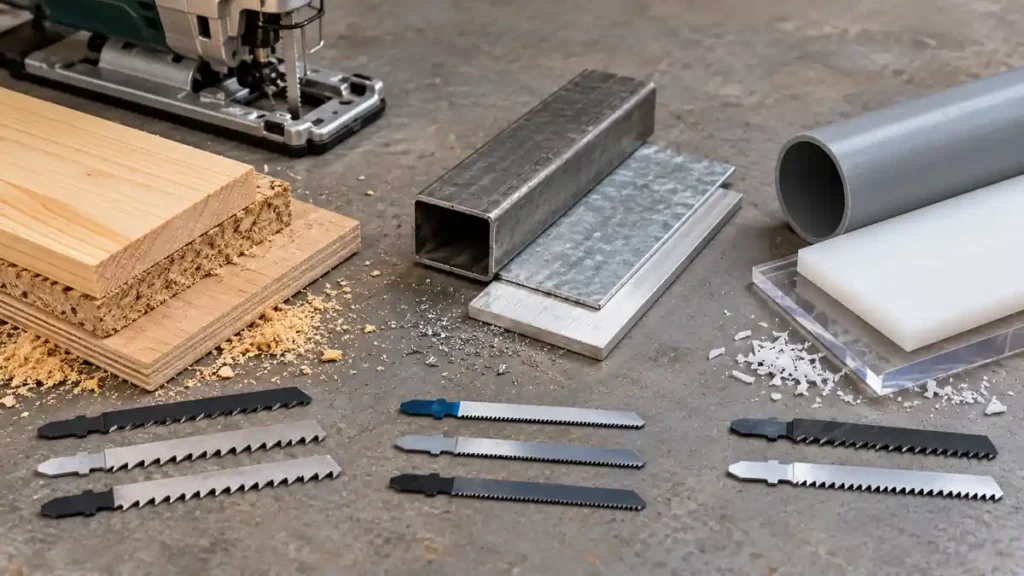
Choose a jigsaw blade by checking five factors: the shank must fit the blade clamp, the blade must be made for the workpiece material, its tooth pattern must suit the desired cut quality, its width and stiffness must match the cutting path, and its working length must clear the material throughout the blade stroke. Start with the jigsaw manual, then use the blade manufacturer’s application markings or selection chart.
A blade that fits the tool can still be wrong for the cut. For example, a narrow wood-cutting blade may handle curves well but deflect during a long cut through thick hardwood. A fine-tooth metal blade may produce controlled cuts in thin metal yet cut wood slowly and generate excess heat. Selection works best when compatibility, material, cut shape, and workpiece thickness are evaluated together.
Once you know the blade type your project needs, compare jigsaw blades by material, shank and cutting profile to build a suitable shortlist.
Use This Blade Selection Order
- Confirm the shank interface. Identify whether the jigsaw accepts T-shank blades, U-shank blades, or another documented interface.
- Identify the material. Separate softwood, hardwood, plywood, laminate, steel, stainless steel, aluminum, and plastics rather than treating them as interchangeable.
- Choose the required cut quality. Fast rough cuts, clean finish cuts, straight cuts, and tight curves call for different tooth and blade designs.
- Match the teeth to material thickness. Several teeth should normally remain engaged in the workpiece, but the correct tooth pitch depends on the blade design and material.
- Check blade width and stiffness. Wide, rigid blades generally favor straight tracking. Narrow blades are better suited to curved paths.
- Verify working length. The blade needs adequate clearance below the workpiece at every point in its stroke.
- Read application restrictions. Confirm that the blade is intended for the exact material and falls within any thickness range stated by its manufacturer.
Start with T-shank and U-shank compatibility if the clamp type is unfamiliar.
Confirm Shank Compatibility First
The shank is the upper portion held by the jigsaw’s blade clamp. The two familiar interfaces are T-shank and U-shank, but their presence in stores does not establish compatibility with a particular saw.
- T-shank blades have lateral projections near the top that form a T-like profile. They are common in many current jigsaws, including models with tool-free blade clamps.
- U-shank blades have a U-shaped opening at the end of the shank. They are associated with certain blade holders, including some older jigsaw designs.
The shank mainly determines how the blade attaches. It does not establish whether the blade is suitable for wood, metal, laminate, or plastic. T-shank and U-shank blades should not be treated as interchangeable, and a blade shank should never be filed or modified to fit a clamp.
Check the exact jigsaw manual or manufacturer documentation before buying or installing a blade. Some clamps have narrower compatibility requirements than a broad shank label suggests. After installation, the blade must be fully seated and secured according to the tool instructions, with proper engagement at the guide roller where the design requires it.
Match Blade Construction to the Material
Blade packaging commonly identifies both the blade construction and intended workpiece. The application label is more useful than selecting solely by the hardest or most expensive blade material.
| Blade Construction | Common Applications | Selection Notes |
|---|---|---|
| High-carbon steel (HCS) | Many wood and wood-based material applications | Flexible construction can suit general woodworking, but the exact tooth design and material range still matter. |
| High-speed steel (HSS) | Certain metal-cutting applications | Choose according to the specified metal type and thickness. A general metal label does not cover every alloy. |
| Bi-metal (BIM) | Wood, metal, or mixed applications, depending on the tooth design | Combines different materials in the blade body and cutting edge. Application markings remain necessary. |
| Carbide-tipped or carbide-tooth | Abrasive or demanding materials identified by the manufacturer | Individual cutting teeth or tips remove material. Suitability varies among blade designs. |
| Carbide-grit | Selected abrasive materials | An abrasive edge cuts differently from a toothed blade. It should not be confused with carbide-tooth construction. |
The comparison of HCS, HSS, bi-metal and carbide blade construction explains why the cutting-edge material is separate from the shank style.
Wood and Wood-Based Panels
Wood blades vary from aggressive designs for rapid cuts to fine-tooth designs intended for a cleaner edge. Hardwood, softwood, plywood, MDF, particleboard, and laminate-faced panels can behave differently. Use the blade manufacturer’s listed applications rather than assuming every wood blade suits every wood-based product.
For plywood and veneered panels, tooth direction affects which face is more exposed to tear-out. Many conventional jigsaw blades cut on the upstroke, while reverse-tooth blades cut in a different direction. Follow the blade markings and plan workpiece orientation around that cutting direction. A splinter guard and reduced orbital action may help with some configurations, but neither guarantees a chip-free edge.
Metal
Metal blades usually use smaller, more closely spaced teeth than fast-cutting wood blades. Select for the specific metal, such as mild steel, stainless steel, or aluminum, and verify the stated material-thickness range. A blade marked for general metal work may be unsuitable for stainless steel or a particular nonferrous alloy.
Thin sheet requires firm support and clamping to reduce vibration. Metal chips can remain sharp and hot, so protect eyes, keep hands away from the cutting area, and clean debris with a brush after the tool stops. Speed and lubricant guidance should come from the jigsaw and blade manufacturers because suitable practices differ by material and equipment.
Plastic and Laminate
PVC, acrylic, polycarbonate, and other plastics respond differently to cutting heat and tooth pressure. A material-specific blade can reduce the risk of melting or chipping, but operating speed and feed rate remain important. Do not assume a fine wood blade is approved for every plastic.
Laminate flooring and countertops also vary in construction. Some contain wood-fiber cores, while others use different substrates or surface layers. Check the material manufacturer’s cutting guidance along with the blade application label.
Understand TPI, Tooth Pitch, and Tooth Direction
Teeth per inch (TPI) describes tooth spacing. A higher TPI means more teeth within an inch, while a lower TPI means wider spacing. TPI alone does not determine cut quality. Tooth shape, tooth set, cutting direction, blade material, workpiece thickness, feed pressure, and jigsaw settings all influence the result.
Coarser tooth patterns generally remove material more aggressively and leave more room for chip clearance. Finer patterns can provide greater control in suitable materials, but teeth that are too fine may clear chips poorly or generate excess heat. Teeth that are too widely spaced for thin material can catch or produce a rough, unstable cut.
Use the manufacturer’s recommended thickness range instead of applying one TPI rule to every material. As a practical check, the tooth spacing should allow multiple teeth to remain engaged through the workpiece. Exact requirements vary with blade geometry and application.
Up-Cut, Down-Cut, and Other Tooth Arrangements
Many standard blades have teeth oriented to cut on the upward stroke. This tends to pull the jigsaw’s baseplate toward the workpiece, but it can also make the upper face more vulnerable to tear-out. Reverse-tooth blades cut in the opposite direction and can shift where surface damage is more likely, although they may change how the tool reacts against the workpiece.
Some blades use specialized tooth arrangements intended for controlled edge quality or cutting in both stroke directions. Read the blade markings rather than inferring cutting direction from tooth size alone. Keep the baseplate firmly supported throughout the cut, particularly with reverse-tooth blades.
Choose Blade Width and Thickness for the Cut Shape
Wide, Rigid Blades for Straighter Cuts
A wider, thicker blade generally resists sideways twisting better than a narrow scrolling blade. This makes it a sensible choice for straight cuts and thicker material, provided the blade is approved for that application.
Rigidity cannot eliminate deflection. Excessive feed pressure, dull teeth, dense material, poor support, or an unsuitable blade can cause the lower part of the blade to wander while the top follows the marked line. A straightedge controls the saw’s path, but it cannot guarantee that the cut face remains square.
Narrow Blades for Curves
Narrow blades can turn through smaller radii than broad straight-cutting blades. Select a blade whose documented turning capability suits the intended curve and workpiece. Tight curves in thick material increase the chance of binding and deflection.
Guide the saw gradually without twisting the tool or forcing the blade sideways. Relief cuts can remove waste around a tight outside curve and give the blade more space to turn. If the required radius is tighter than the blade can follow, use a more suitable blade or cutting method.
Check Working Length, Not Total Blade Length
Total blade length includes the shank and portions that do not contribute to usable cutting depth. Working length is the more relevant measurement. The blade must project completely through the workpiece and retain safe clearance beneath it throughout the jigsaw’s reciprocating stroke.
A blade that barely extends beyond the lower surface can strike the material at the top of its return travel. A long blade is not automatically a better choice either. Additional unsupported length can increase flexibility and deflection.
Confirm all three limits before cutting:
- The blade manufacturer’s stated material-thickness range
- The blade’s usable or working length
- The jigsaw’s documented cutting capacity for that material
Do not treat the saw’s maximum capacity as proof that every compatible blade can cut to that depth.
Account for Cut Quality, Speed, and Jigsaw Settings
Blade choice works together with variable speed, orbital action, and feed pressure. Higher strokes per minute and aggressive orbital movement do not automatically improve a cut.
- Fast rough cuts in suitable wood: A more aggressive tooth design and some orbital action may increase material removal where the tool and blade instructions permit it.
- Clean cuts: A finish-oriented tooth geometry, controlled feed, stable support, and low or no orbital action may reduce aggressiveness.
- Metal: Use a metal-specific blade and follow documented speed guidance. Aggressive orbital action is generally inappropriate unless the manufacturer expressly supports it for the application.
- Curves: A narrow blade, moderate feed pressure, and a less aggressive orbital setting can provide better directional control.
- Heat-sensitive plastic: Match speed and feed to the exact plastic and blade guidance to limit melting.
SPM describes the number of blade strokes per minute. Stroke length describes how far the blade travels during each stroke. Neither specification states how quickly the blade will move through a particular workpiece.
Inspect and Install the Blade Safely
Disconnect a corded jigsaw from its electrical supply or remove the battery from a cordless model before changing or inspecting the blade, following the manufacturer’s instructions. Wait for all movement to stop, and allow a recently used blade to cool before touching it.
Reject blades with missing teeth, cracks, severe discoloration, bent bodies, damaged shanks, or excessive wear. A damaged blade should be replaced rather than straightened for continued use.
Insert the blade using the model-specific clamp procedure. Confirm that it is fully seated, locked, correctly oriented, and aligned with the guide system. Pull only as directed by the manual to verify retention. Restore power after the clamp is secure and the blade has clear travel.
Before cutting, clamp and support the workpiece, provide clearance beneath the cut, and inspect the path for fasteners, wiring, or other hidden hazards. Keep hands away from the blade path and the underside of the material. Wear suitable eye protection and address dust, chips, and material-specific exposure hazards according to the applicable safety guidance.
A Practical Blade-Package Checklist
Before using a blade, confirm that its packaging or technical information answers these questions:
- Does the shank match the exact jigsaw’s approved blade interface?
- Is the blade listed for the specific material?
- Does the workpiece thickness fall within the blade’s documented range?
- Is the tooth design intended for a fast cut, a clean edge, or another defined result?
- Is the blade wide and rigid enough for a straight cut, or narrow enough for the planned curve?
- Does the working length provide clearance throughout the stroke?
- Does the cutting direction suit the desired visible face?
- Are there stated speed, orbital-action, or cooling restrictions?
If any answer is unclear, consult the blade manufacturer’s application chart and the jigsaw manual. Physical fit by itself is insufficient evidence of safe or effective suitability.
For a workshop that needs several blade profiles, compare jigsaw blade sets for several materials after identifying the shank and materials.
Frequently Asked Questions
Can One Jigsaw Blade Cut Wood and Metal?
Some blades are labeled for multiple materials, but many are optimized for a narrower application. Use a blade only for materials listed by its manufacturer. A wood blade’s tooth spacing may be too aggressive for metal, while a fine metal blade can cut wood inefficiently and struggle to clear chips.
Does a Higher TPI Always Produce a Cleaner Cut?
No. Higher TPI provides closer tooth spacing, but cut quality also depends on tooth geometry, material thickness, blade sharpness, cutting direction, feed pressure, support, and tool settings. Excessively fine teeth can create poor chip clearance or excess heat in some materials.
Why Does a New Blade Cut at an Angle?
A new blade can still deflect if it is too narrow or flexible for the cut, pushed too hard, forced around a tight curve, or used in thick material. Incorrect installation, poor workpiece support, guide-roller problems, and blade-clamp issues are other possibilities. Disconnect power before inspecting the blade and guide system. Suspected tool faults should be handled according to the manufacturer’s service instructions.
Are Longer Jigsaw Blades Better for Thick Wood?
They are useful only if their working length and stated application range match the workpiece. Extra length can increase flexibility, so a long blade does not guarantee a square cut. Blade stiffness, tooth design, feed pressure, material density, and the jigsaw’s documented capacity all matter.
Can a T-Shank Blade Be Used in Any Modern Jigsaw?
No. T-shank blades are common, but compatibility must be verified for the exact model. Blade-clamp requirements and permitted dimensions can vary. The jigsaw manual remains the controlling reference.
The reliable way to choose a jigsaw blade is to narrow the options in sequence: verify the shank, match the material, select the tooth pattern for the required finish, choose the width and stiffness for the cutting path, and confirm usable length and thickness limits. Final checks against the saw manual and blade application information help prevent poor cuts, premature wear, and unsafe blade installation.
