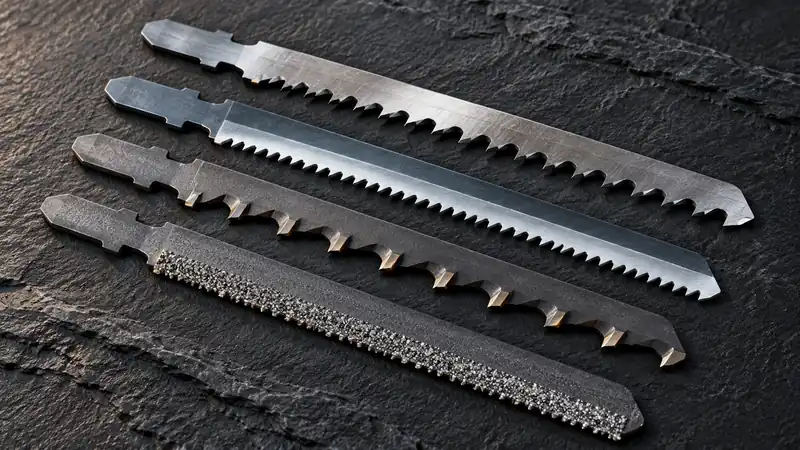
HCS, HSS, bi-metal and carbide describe the construction of a jigsaw blade’s body or cutting edge. They help explain where a blade belongs, but the manufacturer’s material and thickness rating remains the deciding specification. The blade’s shank, tooth geometry and working length must also suit the saw and the cut. If you want a durable toothed blade for an approved wood or metal application, compare bi-metal jigsaw blades by their individual ratings. “Bi-metal” does not mean every blade in the group cuts the same materials.
Separate Three Different Blade Questions
First ask whether the blade fits the clamp. Next ask whether its cutting edge is rated for the workpiece. Finally ask whether its shape, length and tooth pattern can produce the cut you need. Answering only the first question is how a blade that fits perfectly becomes the wrong tool for the job.
| Construction | What the label describes | Application check still required |
|---|---|---|
| HCS | High-carbon steel construction | Wood or plastic type, thickness and finish |
| HSS | High-speed steel construction | Exact metal or other listed material |
| Bi-metal / BIM | Typically HSS teeth joined to a flexible steel body | Whether rated for clean wood, metal or nail-embedded wood |
| Carbide teeth or strip | A carbide cutting edge with a defined tooth pattern | Specific tough or abrasive material and thickness |
| Carbide or diamond grit | An abrasive edge rather than ordinary saw teeth | Listed tile, composite or other approved application |
For the complete sequence, including shank and tooth selection, use the full blade-selection process. Construction is one step in that sequence, not a substitute for it.
HCS: Useful When Its Application Matches
HCS blades are commonly supplied for wood and some plastics. The exact tooth form determines whether a particular blade is intended for faster straight cuts, cleaner edges or tighter curves. A flexible body can be useful, but flexibility is not the same as resistance to wandering in a thick cut. Do not choose an HCS blade for an abrasive board simply because the board contains wood. Surface layers and fillers can change the cutting-edge requirements. Likewise, a wood blade’s appearance does not establish suitability for acrylic.
Read the Edge Geometry Alongside the Steel Label
Two HCS blades can have different widths, tooth pitches and tooth directions. Those differences affect the cut they are designed to make. A blade intended to remove wood quickly is not automatically the best choice for a coated shelf edge, even when both applications involve a wood-based core. Match the complete specification rather than expecting the steel abbreviation to describe the finished surface.
Inspect the work from both faces when finish matters. An upward-cutting blade and a reverse-tooth blade can place the more vulnerable exit surface on different sides. The steel label does not establish that direction. Likewise, a narrow body intended for curves should not be expected to behave like a wider blade selected for resistance to sideways movement.
HSS: Read the Metal Rating Carefully
HSS appears on blades intended for specified metal-cutting applications. Check the alloy and stock thickness, not only the word “metal.” Aluminum, ordinary sheet steel and stainless steel can require different blades and operating conditions. A fine-looking tooth pattern is not proof of a stainless rating. Once the blade is selected, follow the metal-cutting workflow for support and controlled cutting rather than using the same settings as a rough wood cut.
Separate Material Hardness from Stock Geometry
A blade’s cutting-edge construction and the thickness of stock it can engage are different selection dimensions. A blade may name the correct metal but still be unsuitable for a very thin sheet or a thick section. Check the stated thickness range and tooth arrangement after confirming the material rating.
The shape of the stock matters too. A flat sheet offers a different support problem from a tube or angle. As a blade passes through a profile, its engagement can change, so a general metal label provides too little information. Use the blade’s application details and the saw’s capacity together; do not turn one successful cut in ordinary steel into permission to use the same blade in stainless.
Bi-Metal: Construction Is Broader than One Use
A bi-metal blade can combine a resilient body with wear-resistant teeth. That construction can appear in very different products: a clean-cut wood blade, a metal blade or a blade expressly intended for wood containing nails. The package must name embedded nails if that is the application. Finding “BIM” on a fine-tooth laminate blade does not give permission to use it through hidden fixings. Identify and remove fixings where possible, and reject stock with unknown hazards that cannot be assessed safely.
Distinguish a Multi-Purpose Set from a Universal Blade
A set can cover several materials by supplying different blades. That does not make each blade suitable for every material pictured on the package. Read the individual blade codes and assign them to their named uses before putting the set in the toolbox. Keeping the original insert or a photograph of the application chart can prevent confusion after the packaging is discarded.
For reclaimed timber, the presence of metal requires more than a flexible blade body. Identify accessible fixings and remove them where practical. Where a rated nail-embedded-wood application is appropriate, check that the exact blade explicitly names it. Unknown screws, hardened fixings or other hidden objects should not be treated as interchangeable with the nails described in a blade’s application list.
Carbide: Distinguish Teeth from Grit
Carbide-tipped or carbide-strip blades retain a tooth pattern. Grit blades use an abrasive cutting edge. Their cutting action and intended materials differ, so one should not be bought as a generic substitute for the other. Compare carbide jigsaw blades around the named material. A stainless-rated carbide blade, a solid-surface blade and a tile grit blade have different jobs. The hardness of the cutting edge does not override the saw manual’s permitted uses or the workpiece manufacturer’s fabrication requirements.
Read Brand Labels without Guessing Equivalence
A manufacturer’s product code is useful for finding the exact rating, dimensions and package. It is less useful as a universal decoding language across brands. Similar-looking code fragments need not indicate identical teeth or applications. Use Bosch jigsaw blade options to compare Bosch’s named applications and individual codes. For DEWALT jigsaw blades, read the listed material, tooth form and dimensions independently rather than translating a Bosch code into a presumed equivalent.
Before ordering, write one sentence: “This exact blade fits my saw, is rated for this material at this thickness, and has the geometry needed for this cut.” If any part remains uncertain, resolve that specification before choosing the pack size.
Build a Useful Blade Record
Record the manufacturer, complete code, shank, working range and named materials. Add the tooth direction and whether the blade is intended for straight cuts or tighter curves. This short record is more reliable than memorizing a color band or a fragment of a product code, especially when several brands share the same drawer.
When replacing a discontinued blade, compare those application details instead of looking only for the same length. A replacement can fit the clamp and still change the turning ability or visible-face finish. If the application information cannot be established, choose a clearly rated alternative rather than treating a visual resemblance as technical equivalence.
