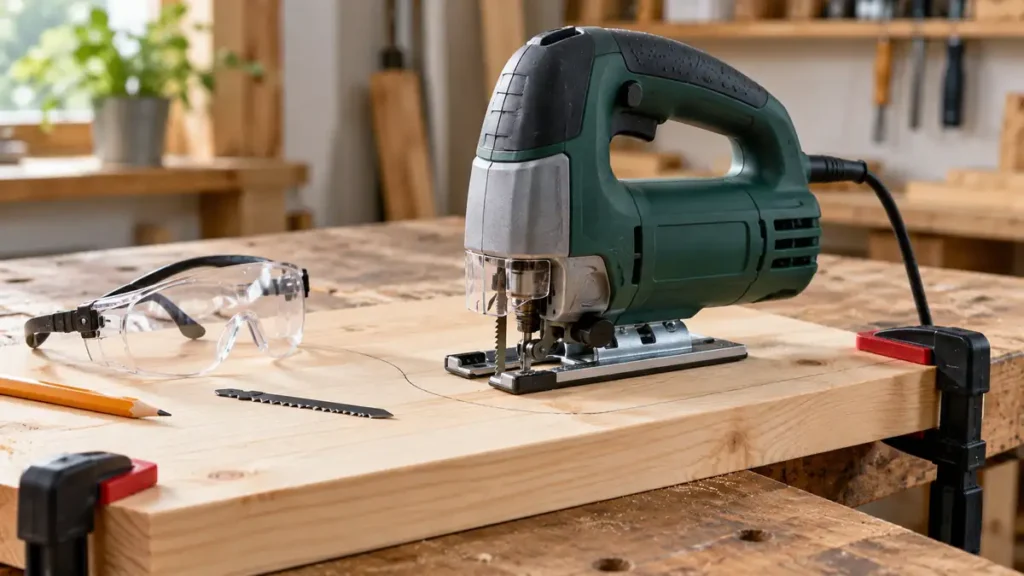
To use a jigsaw, install a compatible blade for the material, clamp and support the workpiece, set the appropriate speed and orbital action, place the baseplate firmly on the surface, and guide the running saw along the marked line without forcing it. Keep the baseplate flat, maintain clearance beneath the cut, and let the blade do the work.
Control layouts, blade clamps, and adjustment procedures vary between jigsaws. Read the tool’s manual before operation, especially before changing a blade, adjusting the baseplate, or using orbital action.
Still choosing your first saw? Compare jigsaws suited to beginners, then use the setup and cutting steps below.
Prepare the Tool and Work Area
Gather the jigsaw, a compatible blade, clamps, a stable work surface, and suitable protective equipment. Eye protection is necessary because wood chips, metal particles, and broken blade fragments can be thrown from the cutting area. Hearing and respiratory protection may also be appropriate for the tool and material.
Check the workpiece for nails, screws, hidden wiring, or other hazards along the cutting path. Confirm that the blade can pass completely through the material without striking the bench, sawhorse, clamp, or another object.
- For a corded jigsaw: Inspect the power cord and keep it away from the blade path. Do not operate the tool with a damaged cord or plug.
- For a cordless jigsaw: Use a battery approved for the exact manufacturer platform and model. Voltage markings alone do not establish compatibility.
- For any jigsaw: Inspect the blade clamp, baseplate, blade guard, and guide roller where fitted. Do not operate a damaged or improperly assembled tool.
How to Use a Jigsaw Step by Step
-
Choose a blade for the material and cut. The blade must fit the jigsaw’s clamping system and suit the workpiece. T-shank and U-shank blades use different interfaces and are not automatically interchangeable. Consult the tool manual if compatibility is unclear.
-
Disconnect the power before installing the blade. Unplug a corded saw or remove the battery from a cordless model, following the manufacturer’s instructions. Wait for all movement to stop, and let a recently used blade cool before handling it.
-
Install and check the blade. Open or loosen the blade clamp using the procedure specified for the tool. Insert the blade in the required orientation and seat it fully. Secure the clamp, then check that the blade is retained correctly and aligned with the guide roller where the design requires it. Never run the saw with a loose blade.
-
Mark the cutting line. Use a pencil, marker, square, or template suited to the surface. Make the line easy to see without making it so wide that its intended edge becomes unclear.
-
Support and clamp the workpiece. Place it on a stable surface with the cutting path clear underneath. Support both the main piece and any large cutout that could fall, pinch the blade, or tear away near the end of the cut. Position clamps outside the jigsaw’s travel path.
-
Set the baseplate and controls. Lock the baseplate at the required angle. For a square cut, verify that it is secured in its normal position. Select speed and orbital action according to the material, blade, desired finish, and manufacturer guidance.
-
Position the saw at the start. Rest the front of the baseplate flat on the workpiece while keeping the blade clear of the material. Align the blade with the waste side of the cutting line. Keep both hands in safe operating positions and away from the underside of the workpiece.
-
Start the jigsaw. Switch it on according to the manual and allow the blade to establish stable movement before feeding it into the material. Variable-trigger behavior differs among models, so use the controls as documented for the saw.
-
Guide the saw through the cut. Keep the baseplate in full contact with the surface. Apply steady forward guidance without pushing hard. Watch the blade near the cutting line rather than trying to steer by twisting the tool sideways.
-
Finish and shut down safely. Support the offcut as the blade reaches the end. After the blade exits, release the trigger or switch and wait for movement to stop before lifting or setting down the jigsaw. Disconnect power before adjustments, blade inspection, or cleanup.
Select a Blade That Matches the Job
A blade that physically fits the clamp may still be unsuitable for the material. Blade construction, tooth geometry, width, thickness, working length, and cutting direction all affect performance.
| Cutting Task | Blade Characteristics to Look For | Operating Consideration |
|---|---|---|
| General wood cutting | Wood-rated blade with tooth geometry suited to the desired speed and finish | Aggressive teeth and orbital action can increase cutting speed but may leave a rougher edge |
| Clean plywood or laminate cuts | Blade specifically intended for clean cuts in the material | Tooth direction affects which face is more vulnerable to tear-out |
| Curved cuts | Narrow blade rated for the material and intended curve | Feed slowly and avoid forcing the blade around a radius it cannot follow |
| Metal cutting | Metal-rated blade appropriate for the particular metal and thickness | Secure the workpiece firmly and follow blade guidance for speed and lubrication |
| Thick material | Sufficient working length and suitable blade stiffness | The blade needs clearance throughout its full stroke, and deflection becomes more likely |
More teeth per inch do not automatically produce the best result. The correct tooth pitch depends on the material and its thickness. Use the application range provided by the blade manufacturer rather than applying one TPI rule to every cut.
Total blade length is also different from usable cutting length. Confirm that the blade remains clear beneath the workpiece during the entire stroke and that neither the saw nor blade exceeds its documented cutting capacity.
Match the blade to the material using the process in how to select a jigsaw blade.
Set Speed and Orbital Action for the Material
Variable Speed
Variable speed changes the blade’s strokes per minute. It does not change the stroke length, which is the distance the blade travels during each stroke. The suitable speed depends on the blade, material, thickness, and desired cut quality.
High speed can be effective for many wood cuts, while some metals and plastics require more controlled settings to limit heat buildup or material damage. These are broad tendencies rather than universal settings. Follow the blade and jigsaw manufacturers’ recommendations.
Orbital Action
With straight reciprocating action, the blade primarily moves up and down. Orbital or pendulum action adds forward and backward movement during the stroke. A more aggressive orbital setting can speed up certain wood cuts, but it may make the cut rougher and harder to control.
Reduced orbital action or straight blade movement is often used for cleaner cuts, tight curves, and materials that require controlled blade engagement. Selector positions vary by manufacturer, so a numbered setting on one jigsaw may not correspond to the same behavior on another.
For the setting trade-off, see how orbital action changes the cut.
Guide the Jigsaw Through Different Cuts
Straight Cuts
Mark a clear line and use a blade with enough stiffness for the material thickness. Keep the shoe flat and advance at a pace the blade can maintain. Pushing too hard can cause the blade to wander or deflect below the surface.
A clamped straightedge can help guide the baseplate if the saw’s shape allows consistent contact. Measure the offset between the blade and the edge of the baseplate before positioning the guide. A guide controls the tool’s surface path, but it cannot guarantee a perfectly square cut if the blade bends underneath.
For long cuts requiring a highly straight, square edge, another saw type may be more suitable. A jigsaw is particularly useful where curves, cutouts, or mixed cutting paths are required.
Curved Cuts
Choose a narrow curve-cutting blade rated for the material. Begin with a gradual turn and use light feed pressure. Do not twist the jigsaw to force the blade through a radius that is too tight.
Relief cuts can help with tight exterior curves. These short cuts enter from the waste edge and end near the layout line, allowing waste sections to fall away as the main curve progresses. Keep each relief cut out of the finished portion.
Internal Cutouts
An internal cut needs an entry point because there is no exposed edge from which to start. A common method is to drill a starter hole large enough to admit the selected blade without binding. Disconnect the jigsaw from power while inserting the blade into the hole, then position the baseplate securely before starting.
Some jigsaws and applications support plunge cutting, but it demands specific tool capability, blade selection, and technique. Use that method only where the manufacturer permits it. A drilled starter hole is generally easier to control.
Bevel Cuts
Disconnect power before changing the baseplate angle. Release the bevel mechanism, set the required angle as described in the manual, and lock it securely. Verify the setting with an appropriate measuring tool when angle accuracy matters, since a detent or scale marking may require checking.
A bevel position changes blade clearance and cutting geometry. Clamp the material carefully, keep the angled baseplate supported, and expect blade deflection to have a greater effect on the finished edge.
Keep the Cut Square and Prevent Blade Deflection
A jigsaw blade can follow the marked line on top while bending beneath the surface. The result may look accurate from above but have an angled edge underneath. Several conditions can contribute:
- Excessive forward pressure
- A dull, bent, or damaged blade
- A blade that lacks suitable stiffness for the material
- Material that is thick relative to the blade and tool’s capabilities
- Forcing a tight curve
- Incorrect blade installation
- Poor workpiece support or blade pinching
- A damaged or misaligned guide mechanism
If the blade begins wandering, stop the tool and let it come to rest. Disconnect power before inspecting the blade. Replace a damaged blade rather than attempting to straighten it for continued use. Persistent alignment or guide problems may require manufacturer-approved service.
Reduce Tear-Out and Surface Damage
Jigsaw blades commonly cut on a particular stroke direction, but reverse-tooth and other specialized designs behave differently. Check the blade markings or packaging to identify the cutting direction. The surface where the teeth exit the material is often more vulnerable to tear-out.
A suitable clean-cut blade, reduced orbital action, firm support, and a controlled feed rate can improve the edge. A compatible splinter guard may also help. None of these methods guarantees a completely chip-free surface, especially with fragile veneer or brittle laminate.
Protect easily scratched surfaces from the baseplate using a manufacturer-approved shoe cover or another method compatible with the material and tool. Avoid adding anything beneath the shoe that makes the saw unstable or hides the cutting line.
Material-Specific Operating Precautions
Wood and Sheet Goods
Support panels close enough to the cutting area to limit vibration while leaving the blade path open. Composite sheet materials can produce substantial dust, and painted or treated wood may present additional hazards. Follow material-specific handling guidance and use suitable dust controls.
Metal
Clamp metal securely because thin sheet can vibrate or catch. Use a blade rated for the specific metal and thickness. Steel, stainless steel, aluminum, and other nonferrous metals do not share one universal blade or speed setting. Metal chips can be sharp and hot, so keep the work area controlled and avoid brushing chips away with bare hands.
Plastic and Acrylic
Plastics differ in their tendency to chip, crack, or soften from heat. Select a blade specifically recommended for the material and control the cutting speed and feed rate. If the cut begins melting behind the blade or the material starts chipping heavily, stop and reassess the blade and settings.
For heat-sensitive or brittle sheet, review setting up a jigsaw for plastic before applying wood-cutting settings.
Shut Down, Clean, and Store the Jigsaw
After the blade stops, unplug the cord or remove the battery before cleaning or inspecting the tool. Let the blade cool before removal. Clear loose dust and chips from the baseplate, blade-clamp area, guide roller, and ventilation openings using methods approved by the manufacturer.
Inspect the cord, battery interface, baseplate, blade clamp, and accessories before storage. Do not immerse the jigsaw, use an unsupported solvent, open a battery pack, or attempt an internal electrical repair. Store the tool and blades in a dry location where the blades will not be bent or damaged.
Frequently Asked Questions
Should You Push Down on a Jigsaw While Cutting?
Use enough downward control to keep the baseplate seated against the workpiece, but do not bear down heavily. Excessive downward or forward force can increase vibration, slow the blade, damage the workpiece, or contribute to blade deflection.
Can a Jigsaw Start a Cut in the Middle of a Board?
Yes. Drill a suitable starter hole within the waste area, insert the stationary blade, place the baseplate securely, and then start cutting. Plunge cutting should be reserved for tools and applications whose manufacturers specifically permit it.
Why Does the Jigsaw Jump or Vibrate?
Possible causes include an unsupported workpiece, a loose or unsuitable blade, excessive feed pressure, incorrect settings, or poor baseplate contact. Stop, disconnect power, and inspect the setup before continuing.
Can You Use a Jigsaw With One Hand?
Use the grip and hand placement specified by the manufacturer. Many cuts require stable two-handed control, especially during startup, curved cutting, or work near an edge. Never use the free hand to hold a small workpiece close to the blade.
Reliable jigsaw operation depends on three fundamentals: a compatible blade, stable workpiece support, and controlled feed pressure. Keep the baseplate planted, choose settings for the actual material, and stop to correct binding or wandering rather than forcing the saw forward.
