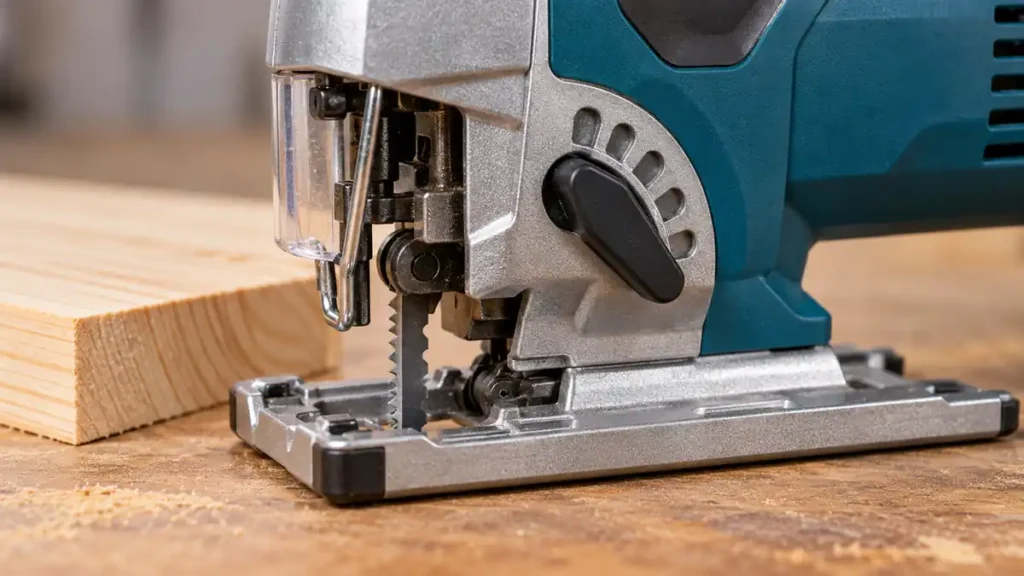
Orbital action on a jigsaw adds a forward-and-back movement to the blade’s normal up-and-down stroke. With orbital action engaged, the blade follows a slightly elliptical or pendulum-like path. It moves forward into the material during the cutting stroke and retreats during the return stroke. This more aggressive movement can increase cutting speed in suitable materials, especially wood, but it can also produce a rougher edge and reduce control.
Most orbital jigsaws have a selector that offers straight reciprocating action plus one or more orbital levels. Higher settings generally create more pronounced forward movement. Selector numbers and operating behavior vary between models, so settings are not directly comparable across manufacturers.
If you need a saw with adjustable cutting controls for wood projects, compare these woodworking jigsaws with adjustable cutting controls alongside the setting guidance below.
How Orbital Action Changes Blade Movement
With orbital action turned off, the blade travels primarily along a straight vertical path. The teeth remove material during the cutting stroke, while the blade follows nearly the same path on its return.
Orbital action changes this cycle by moving the blade forward into the workpiece during the cutting portion of the stroke. The blade then pulls slightly away as it returns. This movement can help the teeth engage material more aggressively and can improve chip clearance in some wood-cutting applications.
The effect is separate from variable speed:
- Orbital action changes the shape of the blade’s movement.
- Variable speed changes how many strokes the blade makes over a period of time.
- Feed rate is how quickly the operator advances the saw through the workpiece.
- Stroke length is the distance the blade travels during each stroke.
These factors interact, but they describe different parts of jigsaw operation. Increasing orbital action does not increase the tool’s SPM setting, and increasing SPM does not create orbital movement.
What the Orbital Settings Mean
A typical orbital-action selector includes a straight-stroke position and several progressively more aggressive positions. Some jigsaws use numbers, while others use symbols or different control arrangements.
| General Setting | Blade Movement | Typical Use | Likely Trade-Off |
|---|---|---|---|
| Off or straight stroke | Primarily vertical | Metal, brittle materials, tight curves, and cuts requiring greater control | May cut wood more slowly |
| Low orbital action | Slight forward movement | Controlled wood cuts and moderate curves where the blade manufacturer permits it | May increase surface tear-out |
| Medium orbital action | More pronounced pendulum movement | General wood cutting where speed has priority over the finest edge | Less suitable for tight turns or delicate surfaces |
| High orbital action | Most aggressive forward movement | Fast, relatively straight cuts in suitable wood and similar materials | Rougher edges and reduced control are more likely |
This table describes general tendencies rather than universal selector instructions. A setting labeled “1” on one jigsaw may behave differently from the same number on another. The tool manual and blade application guidance should determine the exact setting.
When Orbital Action Is Useful
Fast Cuts in Wood
Moderate or high orbital action can be useful for quick cuts in softwood, construction lumber, and some wood-based panels. The aggressive blade movement removes material rapidly and helps clear sawdust from the kerf.
This setting makes the most sense where speed matters more than a finely finished edge. Examples include rough sizing, demolition-related trimming within the tool’s intended use, or cuts that will later be refined by another process.
For rough wood cuts where speed matters more than the finished edge, compare blades for faster wood cutting.
Longer, Gentle Curves
A low orbital setting may work for broad curves in wood if the blade manufacturer permits it. The setting should remain mild because aggressive orbital movement makes the saw harder to steer through a changing path.
For tighter curves, straight stroke is generally easier to control. A narrow blade suited to the material and curve is also important. Orbital action cannot make a wide blade follow a radius that its geometry does not allow.
When to Turn Orbital Action Off
Metal Cutting
Straight reciprocating action is commonly used for metal. Aggressive orbital movement can make tooth engagement too harsh, increase vibration, and reduce control. Metal cutting also requires a compatible blade, a securely clamped workpiece, and a speed appropriate for the exact material and blade.
Steel, stainless steel, aluminum, and sheet metal do not share one universal setup. Follow the jigsaw and blade manufacturers’ application guidance rather than applying a wood-cutting setting to metal.
Clean or Delicate Cuts
Orbital movement can increase tear-out at the cut edge. Turning it off, or selecting a low level, can help when cutting finished plywood faces, veneers, laminates, or other surfaces where edge quality matters.
Orbital action is only one influence on splintering. Tooth direction, tooth geometry, blade sharpness, material support, feed pressure, and surface orientation also affect the result. A zero setting cannot guarantee a splinter-free cut.
Tight Curves and Intricate Shapes
Tight turns require controlled steering and an appropriate narrow blade. High orbital action pushes the blade more aggressively into the material, which can make it resist changes in direction. Forcing the saw around a radius can bend or deflect the blade and leave an angled cut surface.
Brittle or Heat-Sensitive Materials
Some plastics, acrylics, laminates, and brittle sheet products respond poorly to aggressive blade engagement. Chipping, cracking, or heat buildup may result from an unsuitable combination of blade, speed, feed pressure, and orbital movement. Use material-specific blade guidance and start with straight action unless the documentation supports another setting.
How to Choose an Orbital Setting
Select the setting by balancing cutting speed, edge quality, and control. A practical sequence is:
- Identify the material. Confirm that the jigsaw and selected blade are suitable for it.
- Decide which result matters most. Faster rough cutting may support more orbital action. Fine edges and intricate paths generally call for less.
- Check the blade instructions. Blade construction, width, tooth geometry, and intended application can limit suitable settings.
- Consult the jigsaw manual. Use the manufacturer’s material recommendations and selector descriptions.
- Test on scrap when possible. Check edge quality, steering response, vibration, and blade behavior before cutting the workpiece.
- Reduce the setting if control declines. Slow the feed rather than forcing the tool through the material.
Stop the tool and wait for the blade to stop before changing the orbital selector unless the manufacturer explicitly describes a different adjustment procedure. Disconnect a corded jigsaw or remove the battery before changing the blade, clearing packed debris, or performing maintenance.
Choose the orbital setting together with the blade selection by material and cut shape, rather than treating either as a cure for every cut.
Orbital Action Does Not Replace Proper Technique
A high orbital setting cannot compensate for a dull, damaged, or unsuitable blade. It also does not prevent blade deflection. Thick material, excessive feed pressure, tight turns, insufficient blade stiffness, and poor workpiece support can cause the lower portion of the blade to wander while the top appears to follow the marked line.
For controlled cutting:
- Use a blade compatible with the jigsaw’s clamp and intended for the material.
- Confirm that the blade has enough usable length and clearance throughout the stroke.
- Secure and support the workpiece while keeping the cutting path clear underneath.
- Keep the baseplate flat against the workpiece.
- Guide the saw steadily without pushing it sideways.
- Reduce orbital action before attempting tight curves or delicate edges.
- Keep hands away from the blade path and the underside of the cut.
If the tool vibrates excessively, the blade wanders, or the cut becomes rougher than expected, stop and inspect the setup after disconnecting power. Check for a worn blade, incorrect installation, unsuitable settings, poor support, or a damaged blade guide. Suspected mechanical faults should be handled according to the manufacturer’s service instructions.
Does Every Jigsaw Have Orbital Action?
No. Some jigsaws operate only with straight reciprocating blade movement. Others provide several orbital positions, sometimes described as pendulum settings. Control location, selector markings, and the amount of movement differ by model.
Orbital action also has no direct connection to whether a jigsaw is corded or cordless, barrel grip or D-handle. Any of those configurations may include the feature. Its presence and adjustment range depend on the specific tool.
Orbital Action Is a Speed-and-Control Trade-Off
Orbital action makes a jigsaw blade move forward and backward as it reciprocates, creating a more aggressive cutting path. Higher settings can help a suitable blade cut wood faster, while lower settings or straight action generally provide better control for tight curves, delicate surfaces, metal, and finish-oriented work.
The best setting depends on the jigsaw, blade, material, and desired edge quality. Use the tool manual as the primary guide, then adjust conservatively if the cut becomes difficult to steer, excessively rough, or prone to blade deflection.
