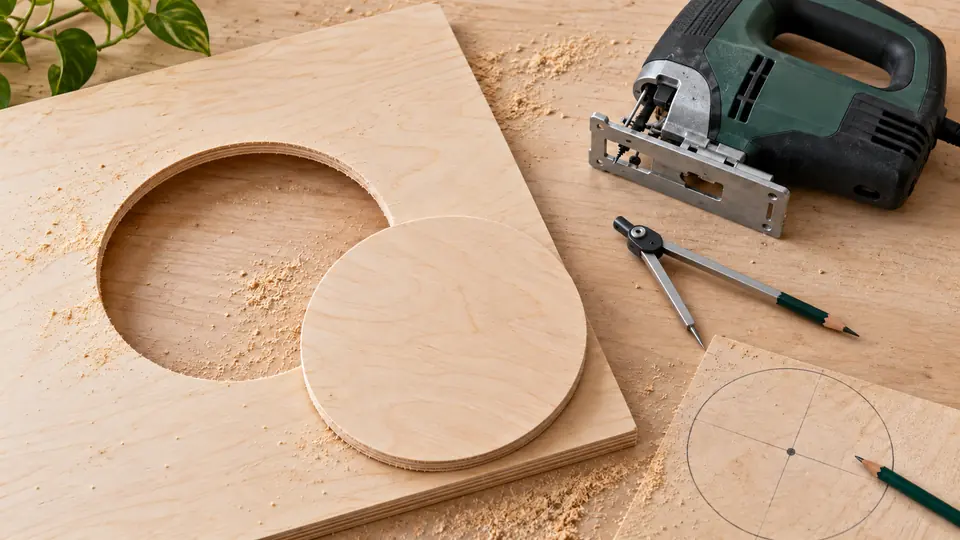
To cut a circle with a jigsaw, establish the required finished diameter, choose a blade that can turn within that radius and support both the retained piece and the waste. A compatible pivot guide can control the saw’s path, but it cannot prevent an unsuitable blade from bending. For an internal opening, plan a starter hole inside the waste and leave any finishing allowance on the correct side of the line. Compare circle-cutting guides for jigsaws by exact saw compatibility and supported circle size. A router circle jig is not automatically a jigsaw attachment.
Lay Out and Cut the Circle
- Mark the center, finished size and retained side. Distinguish a disk from an opening so the kerf and finishing allowance stay in the waste.
- Select a material-rated blade that can negotiate the planned radius and a guide explicitly compatible with the saw if one will be used.
- Disconnect power while fitting and setting the guide. Check the radius reference, pivot security and full unpowered route.
- Prepare a suitable starter hole for an internal opening, then secure the work and support the waste without obstructing the moving blade.
- Cut with controlled feed and no forced sideways steering. Let the blade stop before withdrawing the saw, then inspect closure and squareness from both faces.
Decide Which Part of the Circle You Want to Keep
A circular disk and a circular opening have opposite waste sides. Label the retained side before setting a guide or drawing the line. The blade removes a kerf, so the blade’s path and the final edge are related but not identical.
| Layout term | Meaning | Check at the saw |
|---|---|---|
| Finished diameter | Required edge-to-edge size | Is it the disk or the opening? |
| Finished radius | Half the finished diameter | Measure from the intended center |
| Blade path | Route taken by the cutting edge | Allow for kerf and finishing on the correct side |
| Pivot setting | Center-to-blade relationship defined by the guide | Follow the guide’s scale and instructions |
| Starter hole | Entry into internal waste | Large enough for the blade without damaging the retained edge |
For example, a 10-inch finished diameter has a 5-inch finished radius. That arithmetic does not by itself establish the guide’s final setting: blade kerf, the retained side and the guide’s reference point still need checking.
Put the Kerf on the Waste Side
The blade removes a band of material rather than drawing an infinitely thin line. For a disk, the retained edge lies inside the surrounding waste. For an opening, the retained edge lies outside the center waste. Marking the waste side makes it easier to position the blade path and avoid cutting away the material needed for the final size.
If the project permits sanding or another finishing operation, mark both the intended finished line and the planned cutting allowance clearly. Do not add a fixed allowance copied from an unrelated material. The amount depends on the required finish and the permitted method. Check that a pivot guide’s reference corresponds to the blade position you are actually using.
Match the Guide to the Saw
Confirm the model list, mounting arrangement and specified circle range. Bosch’s JA1010, for example, is a combined circle and parallel guide with listed compatibility and a stated circle-diameter range. It should not be assumed to fit every Bosch saw or another brand. Check that the pivot can be secured without damaging a finished surface you need to preserve. If the center lies in the retained disk, a pivot hole may be unacceptable. Resolve that before choosing a guide-based method. Disconnect power while installing and adjusting the accessory. Move the unpowered setup through its route to check clamp clearance, cable or hose travel and whether the shoe remains supported.
Verify the Guide without Power
Install the guide as instructed with the tool disconnected. Confirm that its locating parts seat properly and that the adjustment locks securely. Identify which point on the attachment defines the radius. A scale may be useful, but the manual and a trial layout should establish how it relates to the cutting edge rather than a convenient point on the shoe.
Move the unpowered assembly through the planned route without engaging the blade in the work. Check the pivot location, shoe support, hose travel and nearby clamps. If a part catches or the tool cannot complete the circle comfortably, rearrange the setup before cutting. A secure pivot does not make a poorly supported workpiece stable.
Choose a Blade That Can Turn
Use jigsaw blades for curves rated for the material and thickness. A narrow blade can turn more readily, while a wider blade can resist a tight radius. The correct choice depends on both the material and the circle size. A pivot guide does not make the blade infinitely flexible. If the radius is too tight, forcing the saw around the center can make the underside slope or cause the blade to bind. Choose a different blade or method rather than using the guide as a lever.
Plan Entry and Support
For an internal opening, mark a starter-hole location in the waste clear of the finished line. Drill using a method suitable for the material. The hole must admit the blade and allow a controlled approach to the cutting path. Support the center waste so it cannot drop and tear the final connection. Keep every support, fixing and clamp outside the blade’s route beneath the board. For an external disk cut, plan how the surrounding waste remains stable as it separates. Start with the shoe supported and follow the saw manual’s operating sequence. Use general curved-cutting technique if you need help coordinating feed and turning.
Keep the Center from Dropping at Closure
An internal circle leaves a center section that becomes progressively less connected to the surrounding board. Plan how it remains supported as the final arc is cut. Supports must hold the waste without obstructing the blade, and their position may need to differ from the supports under the retained panel. Do not wait until the last inch to decide how to catch the center.
For a disk, consider the surrounding waste as well. A narrow remaining strip can move and pinch or tear near the closing cut. Keep the assembly secure and select a route suited to the material and guide. Stop the blade before withdrawing or resetting the tool, and disconnect power before changing any attachment or blade position.
Diagnose a Circle That Does Not Close Cleanly
If the top edge misses the starting point, inspect pivot movement, guide attachment and the radius setting. If the top closes but the bottom is tapered or offset, inspect blade deflection, side pressure and turning capability. These are different faults. Leave a controlled finishing allowance where the project permits it, then refine the edge with an appropriate method. For repeated tight-tolerance circles, consider whether another cutting process better suits the required finish. A guide helps repeat a path; the blade and material still determine the edge you keep.
Compare the Top and Bottom Before Adjusting the Radius
A circle that is consistently the wrong size may point to the layout or reference setting. A circle that changes shape can point to pivot movement or blade steering. A top edge that closes accurately with a sloped lower edge suggests another issue: the blade may be deflecting through the thickness despite the correct shoe path.
Separate those observations before altering the guide. Changing the radius will not correct a blade that cannot turn at that radius in the chosen stock. Make a representative trial and inspect it from both faces. If the required size or squareness remains outside what the supported setup can achieve, use another suitable process instead of repeating increasingly forceful guided cuts.
