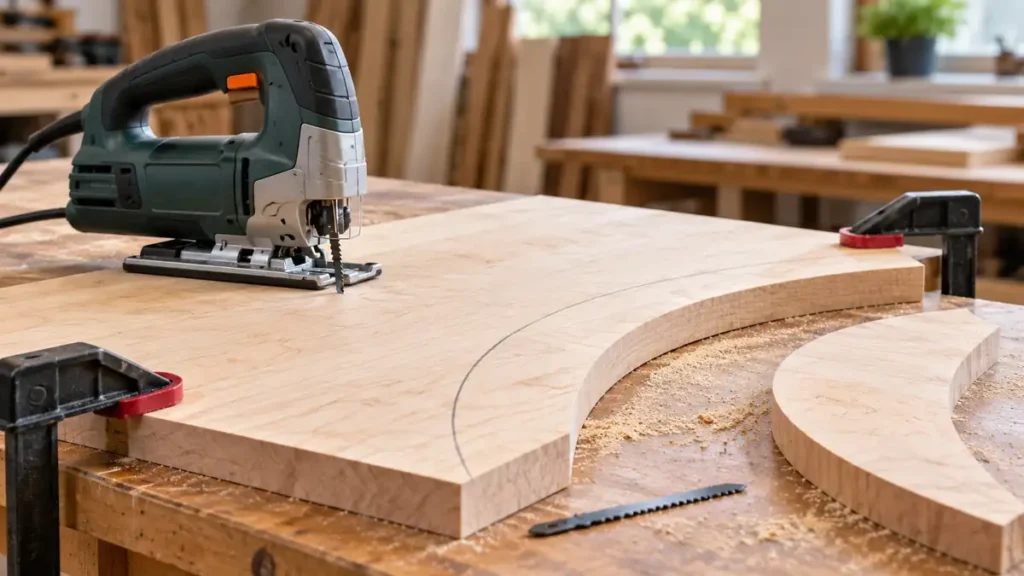
To cut curves with a jigsaw, use a narrow blade suited to the material, secure the workpiece, and guide the saw with slow, gradual turns while keeping the baseplate flat. Match the curve to the blade’s turning capability. If the blade resists the turn, back off and widen the path rather than twisting the tool sideways.
Accurate curved cuts depend more on blade selection, feed pressure, and workpiece support than on force. Cut slightly outside the marked line when the finished edge must be precise, then refine the shape with sanding or another suitable finishing method.
For a tight or detailed curve, compare blades designed for curved jigsaw cuts before choosing the blade for the layout.
What You Need for a Curved Jigsaw Cut
- A corded or cordless jigsaw in serviceable condition
- A compatible blade intended for the workpiece material
- A narrow curve-cutting or scrolling blade for tight radii
- A pencil, marker, template, compass, or flexible curve ruler
- Clamps and a stable work surface
- A drill and suitable drill bit for internal cutouts
- Eye protection and any material-specific protective equipment
- Sandpaper, a file, or another edge-finishing tool
Check the jigsaw manual before selecting controls, changing the blade, or attempting a plunge cut. Blade clamps, orbital selectors, speed controls, and approved operating methods vary between models.
How to Cut Curves With a Jigsaw Step by Step
-
Choose a Blade That Can Follow the Curve
Select a blade that fits the jigsaw’s clamping mechanism and is rated for the material. T-Shank and U-Shank blades use different attachment interfaces, and they are not automatically interchangeable.
Blade width strongly affects turning ability. A narrow blade can usually follow a tighter curve than a broad blade, while a wider blade tends to resist abrupt changes in direction. Blade thickness, tooth geometry, material, and workpiece thickness also affect how well the blade tracks.
Confirm that the blade has enough usable cutting length to pass through the workpiece with safe clearance throughout its stroke. Total blade length is not the same as usable cutting depth.
-
Disconnect Power Before Installing the Blade
Unplug a corded jigsaw or remove the battery from a cordless model before changing the blade, following the manufacturer’s instructions. Allow a recently used blade to cool before touching it.
Insert the blade fully into the clamp using the specified procedure. Confirm that it is locked securely and positioned correctly in relation to the blade guide roller, where fitted. Never operate the saw with a loose or incorrectly installed blade.
-
Mark the Curve Clearly
Draw the cutting line with a template, compass, flexible ruler, or traced pattern. Use a line that remains visible while cutting. If the part will be finished to an exact shape, mark a second reference line or identify the waste side so there is no confusion after the saw starts.
Plan a smooth entry into the curve. An abrupt turn immediately after entering the material can overload the blade and cause it to wander.
-
Secure and Support the Workpiece
Clamp the material to a stable work surface with the cutting path clear below it. Position clamps where they will not obstruct the jigsaw’s baseplate or force a mid-cut stop.
Support both the workpiece and any large waste section. An unsupported cutout can sag, pinch the blade, break away near the end of the cut, or fall unexpectedly. Keep hands away from the cutting path and from the blade beneath the material.
-
Set the Speed and Orbital Action
Use a controllable speed that matches the material and blade manufacturer’s guidance. Excessive speed can make a tight line harder to follow and may create heat problems in some materials. A setting that is too slow can encourage the operator to apply excessive feed pressure.
For tight or controlled curves, straight reciprocating action or a low orbital setting is generally easier to manage than aggressive orbital action. Orbital action moves the blade forward as well as up and down, which can produce a more aggressive cut. Selector positions are model-specific, so consult the jigsaw manual rather than relying on a universal setting number.
-
Start From an Edge or a Starter Hole
For an open curve, begin at the edge of the workpiece with the blade aligned on the waste side of the line. Keep the blade clear of the material while starting the motor, then feed it into the cut after it reaches a stable operating motion.
For an internal cutout, drill a starter hole large enough to accept the stationary blade without the teeth pressing against the sides. Disconnect power before making adjustments or changing between tools. Place the blade in the starter hole, rest the baseplate flat on the surface, and then start the jigsaw according to its operating instructions.
Some jigsaws and applications permit plunge cutting, but the procedure can be difficult to control and is not approved for every model or blade. A drilled starter hole is the more broadly applicable method.
-
Guide the Saw Through the Curve
Keep the baseplate firmly seated against the workpiece. Feed the saw forward while turning the entire tool gradually to follow the line. Watch the cutting path ahead of the blade rather than concentrating on the motor housing.
Let the teeth remove material at their own pace. Heavy forward pressure can bend the blade, widen the kerf, and leave the lower edge of the cut out of alignment with the visible line. Sideways pressure is especially troublesome because a jigsaw blade cuts forward rather than laterally.
If the curve becomes too tight, stop feeding and release the trigger. Wait for the blade to stop before repositioning or withdrawing the tool. Do not twist a moving blade in an attempt to force it back onto the line.
-
Use Relief Cuts Where the Waste Restricts Turning
Relief cuts divide waste material into smaller sections so it can fall away as the main curved cut advances. They are useful on concave curves, sharp transitions, and shapes where the blade would otherwise become trapped between the kerf walls.
Make relief cuts from the waste edge toward the curved line, stopping just short of the finished boundary. As the jigsaw follows the main curve, the small waste sections separate and create room for the baseplate and blade to turn.
Keep every relief cut inside the waste area. Cutting across the finished side cannot be corrected by sanding without changing the intended shape.
-
Complete the Cut and Let the Blade Stop
Reduce feed pressure near the end, particularly if the waste section could break free. Maintain support until the cut is complete. Release the switch and wait for all moving parts to stop before lifting or setting down the jigsaw.
Inspect the edge after disconnecting the tool from power. Smooth minor saw marks with sandpaper or a file. If the blade left a pronounced bevel or wandered beneath the surface, investigate the cause before making another finished cut.
How Blade Shape Affects the Curve
| Blade Characteristic | Effect on Curved Cutting |
|---|---|
| Narrow blade body | Usually follows tighter curves, subject to the blade manufacturer’s intended application |
| Wide blade body | Tracks gradual arcs more readily but resists tight turns |
| Thin or flexible blade | May turn readily but can deflect more in thick or dense material |
| Thicker, stiffer blade | May reduce deflection but cannot necessarily follow a small radius |
| Material-specific teeth | Influence cutting action, chip removal, heat, and edge quality |
A blade labeled for curves still has practical limits. Manufacturers may specify appropriate materials, thickness ranges, or turning capabilities for a particular blade. Do not assume that every narrow blade can follow the same radius.
How to Keep the Blade From Wandering or Deflecting
A jigsaw blade can appear to follow the top line while bending beneath the workpiece. This produces an angled edge, particularly in thick material or during tight turns.
- Reduce feed pressure: Let the blade cut instead of pushing the saw through resistance.
- Use a fresh blade: Dull, bent, or damaged teeth can pull the cut away from the intended path.
- Match the blade to the material: A wood blade is not automatically appropriate for plastic, laminate, or metal.
- Avoid curves tighter than the blade can follow: Use relief cuts, enlarge the radius, or choose another cutting method.
- Keep the shoe flat: Tilting or rocking the jigsaw can produce a beveled edge and unstable tracking.
- Support the material: Vibration and pinching make the blade harder to control.
- Check blade installation: A blade that is loose, incorrectly seated, or improperly positioned at the guide roller may track poorly.
Replace a permanently bent or damaged blade. Attempting to straighten it for continued use can leave a weakened or misaligned blade. If new blades repeatedly sit at an angle or track incorrectly, inspect the clamp and guide components as described in the manufacturer’s documentation. Suspected mechanical faults may require qualified service.
If the grip or controls are limiting the job, compare jigsaws for controlled curved cuts after selecting a suitable blade.
Cutting Different Materials Along a Curve
Solid Wood and Plywood
Wood is commonly cut with a blade whose tooth geometry and construction match the desired speed and edge quality. Tight curves in thick or dense stock place more lateral stress on the blade, so use a gradual feed and watch for deflection.
Plywood can splinter along the face veneer. Tooth direction, workpiece orientation, orbital action, surface support, and splinter guards can all influence tear-out. Follow the blade manufacturer’s guidance rather than assuming that one face should always point upward or downward.
Laminate and Composite Panels
Laminate, MDF, particleboard, and other composite materials behave differently from solid wood. Select a blade approved for the specific material, and protect finished surfaces from baseplate scratches where appropriate. Some composites produce fine dust, so use material-appropriate dust controls and protective equipment.
Metal
Metal curves require a compatible metal-cutting blade, secure clamping, and settings suited to the exact metal and blade. Steel, stainless steel, aluminum, and other nonferrous metals do not share one universal blade or speed requirement. Watch for sharp chips and heat, and follow the tool and blade manufacturers’ instructions.
Plastic and Acrylic
Plastic response varies by type and thickness. Too much heat can soften some plastics, while unsuitable tooth geometry can chip others. Choose a blade specified for the material and adjust speed and feed according to the relevant guidance. PVC, acrylic, and polycarbonate should not be treated as interchangeable.
When a Jigsaw Is the Wrong Tool for the Curve
A handheld jigsaw works well for many arcs, irregular shapes, and internal cutouts, but it has limits. Very small radii, highly intricate patterns, thick stock requiring a precisely square edge, and repeatable finished shapes may call for a different method.
A scroll saw can be more suitable for intricate patterns in compatible material, while a router and template can refine repeatable curves where the application permits. For rough jigsaw cutting followed by routing, leave enough waste for the finishing tool and secure the template according to that tool’s instructions.
Frequently Asked Questions
Can a Jigsaw Cut a Perfect Circle?
A jigsaw can cut a circle, but freehand cutting may require sanding to reach an accurate final shape. A circle-cutting guide can improve consistency if it is compatible with the specific jigsaw. The blade must still be narrow enough for the chosen radius, and a guide cannot prevent blade deflection by itself.
For a repeatable radius, use the setup for cutting a circle with a pivot guide rather than relying on a freehand turn.
Should Orbital Action Be On for Curves?
Low orbital action or straight reciprocating motion usually provides greater control on tight curves. Aggressive orbital action can make the cut faster in some wood applications, but it may also make a detailed line harder to follow. Use the tool manufacturer’s guidance for the material and blade.
Why Does the Blade Bind in a Curve?
Binding can result from a radius that is too tight, excessive feed pressure, closing kerf walls, poor workpiece support, or a blade that is unsuitable for the material. Stop the tool, wait for the blade to stop, and disconnect power before inspecting the cut or blade.
If the cut turns square on top but leans underneath, check the causes of blade deflection.
Should the Cut Be Made Directly on the Line?
For a rough cut, following the line may be sufficient. For a finished component, stay slightly on the waste side and refine the edge afterward. This leaves room to correct small deviations without reducing the part below its intended size.
Clean curved cuts come from matching the blade to the material and radius, keeping the workpiece stable, and steering with gradual forward movement. Allow the blade to cut without sideways force, add relief cuts where waste restricts the turn, and leave a small finishing allowance when the final shape must be precise.
