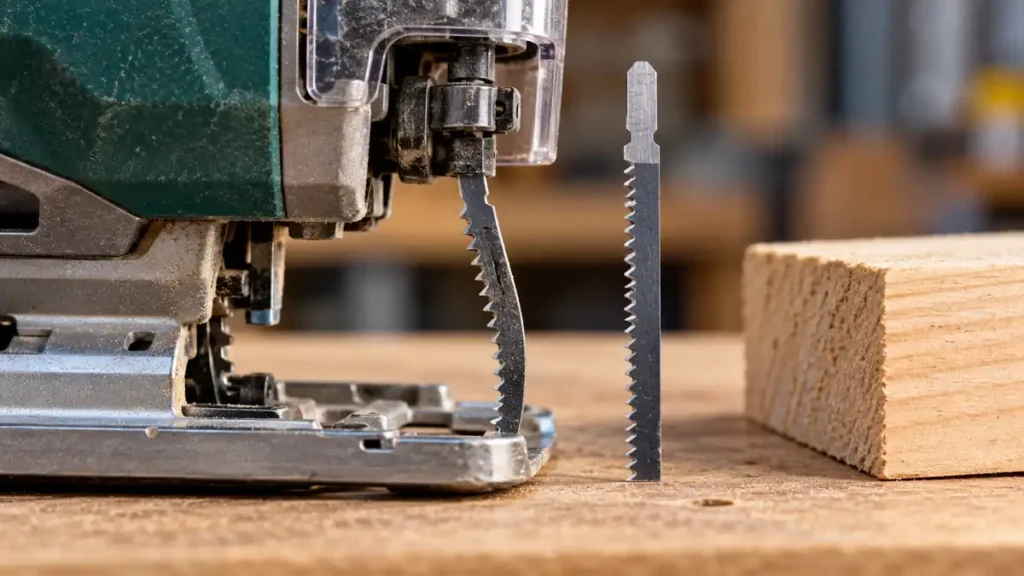
A jigsaw blade usually bends because it is being pushed forward or sideways faster than it can cut. Other common causes include a blade that is too narrow or flexible for the job, a tight turning radius, thick material, dull teeth, incorrect installation, poor workpiece support, or a problem with the blade clamp or guide roller. The bend may be temporary blade deflection during the cut, or permanent damage that requires blade replacement.
Stop cutting if the blade remains bent, begins rubbing against the workpiece, or produces a noticeably angled cut. Disconnect a corded jigsaw from the outlet or remove the battery from a cordless model before inspecting the blade.
If the blade is wrong for the job, compare jigsaw blades matched to different materials and cut types before replacing the saw.
Blade Deflection Is Different From Permanent Bending
A jigsaw blade is supported mainly at the shank and, on many models, by a guide roller near the baseplate. The cutting end remains comparatively unsupported. This arrangement allows the blade to make curved cuts, but it also permits some sideways movement under load.
Blade deflection occurs when cutting forces push the blade away from its normal path. The blade may appear straight after it leaves the material, yet the cut surface can be angled from top to bottom. A jigsaw can follow the marked line at the upper surface while the lower part of the blade drifts to one side.
Permanent bending means the blade stays curved or twisted after removal. A permanently bent blade should be discarded. Trying to straighten and reuse it can produce unpredictable cuts and may place additional stress on the clamp and guide system.
Excessive Feed Pressure Can Deflect the Blade
Pressing hard on the jigsaw is the most frequent cause of blade deflection. The teeth need time to remove material from the kerf. If the saw is forced forward, the upper portion of the blade continues moving with the tool while the lower portion lags behind or moves sideways.
Signs of excessive feed pressure include:
- The saw becomes harder to steer as the cut progresses.
- The blade bows backward or sideways.
- The lower edge of the cut does not follow the upper cut line.
- The motor slows noticeably under load.
- The workpiece or blade becomes unusually hot.
- The cut improves when forward pressure is reduced.
Use enough pressure to keep the jigsaw advancing steadily, then let the teeth establish the feed rate. Pushing harder rarely corrects slow cutting. A slow cut can indicate a dull blade, unsuitable tooth geometry, an inappropriate speed setting, or material that exceeds the documented capability of the tool or blade.
Blade Design Must Match the Cut
Work through choosing blade width, stiffness and working length before changing the cutting setup.
A Thin or Narrow Blade May Lack Stiffness
Narrow blades are useful for curves because they can turn more easily within the kerf. That flexibility also makes them more susceptible to sideways deflection, particularly in thick or dense material. A wider, thicker blade intended for straight cuts generally resists deflection better, provided it is compatible with the jigsaw and suitable for the material.
A wider blade will not correct poor technique or a mechanical fault. It also cannot follow the same tight curves as a narrow scrolling blade. Blade selection must account for the material, thickness, curve radius, cut quality, and the jigsaw manufacturer’s compatibility requirements.
The Blade May Be Too Short
The blade must extend through the workpiece throughout its full stroke, with safe clearance beneath the material. Total blade length is not the same as usable cutting length. If the blade tip enters the workpiece during part of the stroke, it can strike the material, buckle, or damage the cut.
Confirm the blade’s working length and the jigsaw’s documented cutting capacity. Check beneath the workpiece for clamps, supports, cables, and other obstructions before starting.
Dull or Damaged Teeth Increase Cutting Resistance
A dull blade requires more feed force and creates more friction. Missing teeth, worn tooth edges, heat discoloration, cracks, or a twisted blade are reasons to replace it. Select a replacement made for the material being cut. A blade labeled for wood, metal, plastic, or another application may use different construction and tooth geometry.
Do not continue using a blade that is visibly bent or damaged. Do not modify the shank to make an incompatible blade fit the clamp.
Tight Curves Put Sideways Force on the Blade
A jigsaw blade cuts forward through its toothed edge. Turning the tool too sharply forces the side of the blade against the kerf. The blade may twist, deflect, or become permanently bent if the requested radius is tighter than the blade can follow.
For curved cuts:
- Use a compatible blade intended for curved or scrolling work.
- Reduce feed pressure as the curve tightens.
- Turn the saw gradually while keeping the baseplate flat.
- Avoid twisting the tool to force the blade back onto the line.
- Use relief cuts where they can safely remove waste and provide room for the blade to turn.
Orbital action can make cutting more aggressive on jigsaws equipped with that feature. Lower orbital action or straight reciprocating movement may provide better control for tight curves, depending on the material, blade, and tool instructions. Selector positions differ among models, so use the manufacturer’s guidance rather than assuming one setting applies universally.
Thick Material Magnifies Small Cutting Errors
The farther the blade extends below the baseplate, the more leverage cutting forces can exert on it. Thick wood, dense hardwood, layered panels, and some plastics can expose a flexible blade to substantial resistance. A small amount of deflection near the guide can become a clearly angled cut at the bottom of the workpiece.
Use a blade with suitable working length and stiffness, keep the feed rate controlled, and support the material close enough to the cut to limit vibration. A longer blade alone does not guarantee a square cut. Extra length can increase flex if the blade is poorly matched to the task.
Long, highly precise straight cuts may be better suited to another saw type when the workpiece and project permit. A straightedge can guide the jigsaw’s baseplate, but it cannot prevent the lower portion of the blade from deflecting.
For deeper wood cuts, compare jigsaw blades for thicker wood and check the usable length as well as stiffness.
Poor Support and Baseplate Contact Can Destabilize the Cut
An unsupported workpiece can vibrate, pinch the kerf, or shift while cutting. Each condition can push the blade sideways. Clamp the material to a stable work surface and arrange the supports so the waste remains controlled without closing the kerf around the blade.
Keep the baseplate flat against the workpiece unless the tool has been deliberately configured and locked for a bevel cut. Rocking or lifting the saw changes the blade’s relationship to the material and can produce an angled cut that resembles blade bending.
Make sure the blade has clearance below the workpiece. Contact with a bench, sawhorse, clamp, or hidden object can bend the blade immediately and may cause loss of control.
Incorrect Installation or Worn Parts May Be Responsible
If fresh blades bend repeatedly under light, controlled cutting pressure, inspect the blade-holding and guiding components. Procedures and component designs vary, so consult the jigsaw’s manual before making adjustments.
Blade Clamp Problems
A blade that is not fully seated can sit at an angle, wobble, or release during operation. Verify that the shank type is approved for the specific jigsaw. T-shank and U-shank blades use different interfaces, and physical insertion does not establish compatibility.
With the power disconnected, remove and reinstall the blade according to the manufacturer’s procedure. Confirm that it is locked securely. Some blade-release systems can eject the blade, and a recently used blade may be hot.
Guide Roller Problems
On jigsaws equipped with a blade guide roller, the blade should interact with that component as specified by the manufacturer. Accumulated debris, visible roller damage, excessive play, or misalignment can reduce support or push the blade away from its intended path.
Clean accessible dust and chips according to the maintenance instructions. Do not bypass the guide roller, remove guards, or improvise an alignment repair. Suspected internal wear or a damaged clamp should be handled under the manufacturer’s service guidance or by qualified repair personnel.
Baseplate Misalignment
A loose or incorrectly set baseplate can make a straight blade produce a beveled cut. Disconnect power, confirm that the bevel mechanism is locked, and check the baseplate position using the procedure specified for the model. A marked zero-degree stop should not be assumed perfectly calibrated without checking the actual setup.
How to Diagnose a Bending Jigsaw Blade
- Stop the tool. Wait for all movement to cease. Unplug the cord or remove the battery before touching the blade or inspecting the clamp.
- Inspect the blade. Look for curvature, twisting, cracks, missing teeth, heavy wear, or heat damage. Replace any damaged blade rather than straightening it.
- Confirm compatibility. Check that the shank fits the tool’s specified blade interface and that the blade is intended for the material and cut type.
- Check blade length. Verify sufficient usable length and clearance through the entire stroke.
- Reinstall the blade correctly. Seat and lock it according to the owner’s manual.
- Inspect external guiding parts. Check the guide roller, blade clamp area, baseplate, and bevel lock for debris, looseness, or visible damage.
- Improve workpiece support. Clamp the material securely and provide open clearance beneath the cut.
- Make a controlled test cut. Use scrap of the same material when available. Keep the baseplate flat and apply light, steady feed pressure.
- Evaluate the result. If a compatible new blade still bends or cuts at an angle under moderate conditions, stop using the jigsaw and follow the manufacturer’s service instructions.
Preventing Blade Bend on Future Cuts
- Choose a blade suited to the material, thickness, and required curve radius.
- Use a wider, more rigid blade for straight cuts where the application permits.
- Replace dull, twisted, cracked, or permanently bent blades.
- Allow the teeth to set the cutting pace rather than forcing the saw forward.
- Slow down before changing direction.
- Keep the baseplate firmly supported on the workpiece.
- Clamp and support the material so it cannot shift or pinch the blade.
- Verify clearance beneath the full cutting path.
- Use speed and orbital controls according to the blade, material, and tool manual.
- Have repeated clamp, guide, or alignment problems inspected rather than compensating with sideways force.
Some flex is possible because of the jigsaw blade’s slender, cantilevered design. Repeated or permanent bending is a warning that the blade, technique, workpiece setup, or tool mechanism needs attention. Start by reducing feed pressure and installing an undamaged, compatible blade. If the problem persists with proper support and controlled technique, inspect the clamp, guide roller, and baseplate before using the saw again.
If the top follows the mark while the bottom wanders, review keeping a straight cut square.
