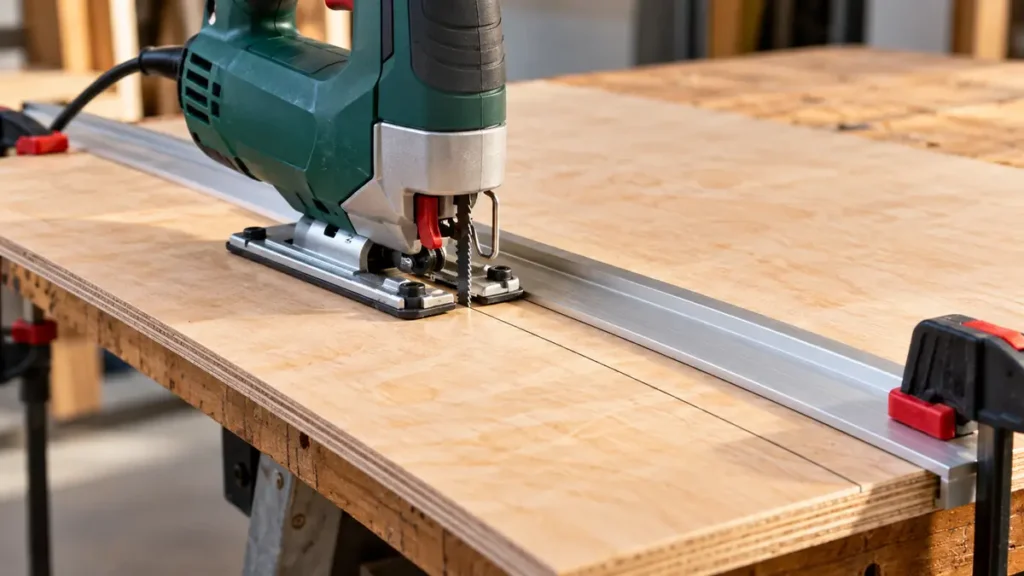
To cut straight with a jigsaw, use a sharp, rigid blade suited to the material, clamp the workpiece securely, and guide the saw against a straightedge or compatible parallel guide. Keep the baseplate flat, apply steady forward pressure, and let the blade cut without forcing it. A guide controls the path of the saw, but careful feed pressure is still needed to limit blade deflection beneath the workpiece.
A jigsaw can produce a clean, reasonably straight cut in wood, sheet goods, plastic, and suitable metals. For long cuts that require high speed or very precise square edges, a circular saw or track saw is usually more appropriate. The jigsaw remains useful for shorter straight cuts, interior cutouts, and jobs where its compact blade provides better access.
For a guided setup, start by comparing jigsaw guides that fit your saw and base; a guide helps control the path while the blade still needs a steady feed.
What You Need for a Straight Jigsaw Cut
- A corded or cordless jigsaw in good operating condition
- A compatible blade intended for the material
- A pencil, marking knife, or suitable material marker
- A square or straightedge
- Clamps
- A stable work surface with clearance below the cut
- A scrap piece for a test cut, if available
- Appropriate eye and hearing protection
- Material-specific dust or chip protection where required
Check the jigsaw manual before installing a blade or adjusting the tool. Blade-clamp designs, orbital controls, speed controls, and accessory compatibility vary among models.
How to Cut Straight With a Jigsaw Step by Step
- Select a suitable blade. Choose a blade that fits the jigsaw’s clamping mechanism and is intended for the material. Straight cuts generally benefit from a relatively wide, rigid blade rather than a narrow scrolling blade. The blade must have enough usable cutting length to pass through the workpiece throughout its stroke.
- Disconnect the power before installing the blade. Unplug a corded jigsaw or remove the battery from a cordless model if the manufacturer directs you to do so. Install the blade fully and confirm that the clamp has secured it. Replace blades that are bent, damaged, dull, or missing teeth.
- Check the baseplate. Confirm that the baseplate, also called the shoe, is locked at the intended angle. For a square cut, verify its position rather than relying entirely on a bevel detent or scale. Disconnect the power before making adjustments.
- Mark the cut. Use a square or long straightedge to draw a clear line. Mark the waste side so you know which side of the line to preserve.
- Support and clamp the workpiece. Position the material on a stable surface with open clearance under the entire blade path. Support both the main workpiece and any large offcut. Arrange the supports so the kerf will not close and pinch the blade.
- Position a guide. Clamp a straightedge parallel to the cutting line, offset by the distance from the blade to the edge of the jigsaw’s baseplate. Confirm that the clamps will not obstruct the motor housing or baseplate.
- Set the speed and orbital action. Follow the jigsaw and blade manufacturers’ guidance for the material. Lower orbital action or straight reciprocating movement often provides greater control and a less aggressive cut. Higher orbital action may cut some wood faster, but it can increase tear-out and make the cut harder to manage.
- Place the saw at the edge. Set the front of the baseplate firmly on the workpiece with the blade clear of the material. Align the blade on the waste side of the line and hold the baseplate against the straightedge.
- Start the saw and feed it steadily. Start the jigsaw according to its operating instructions. Guide it forward while keeping the baseplate flat and in consistent contact with the guide. Use moderate pressure. Slowing down is preferable to forcing the blade through resistance.
- Complete the cut without twisting the saw. Maintain the same orientation through the end of the cut. Support the offcut so it does not break away, pinch the blade, or fall unexpectedly.
- Wait for the blade to stop. Release the trigger and allow the blade to stop before setting down the tool. A blade may be hot after cutting, so avoid touching it immediately.
How to Position a Straightedge Accurately
The blade does not run directly against a clamped straightedge. The edge of the baseplate follows the guide, so the guide must be offset from the marked cut.
- Disconnect the jigsaw from its power source.
- Measure from the blade’s cutting edge to the side of the baseplate that will contact the guide.
- Transfer that distance from the cutting line toward the side where the body of the saw will travel.
- Clamp the straightedge at the offset marks.
- Check the position at both ends before cutting.
A test cut in scrap material can reveal which side of a pencil line the blade removes and whether the guide offset is correct. The measurement may differ between the left and right sides of an asymmetrical baseplate.
The straightedge should be thick enough for the shoe to track against it, yet low enough to clear the jigsaw housing. Confirm that it is straight and securely clamped. A flexible strip that bows under pressure can transfer that curve to the cut.
Choose a Blade That Resists Wandering
Blade choice strongly affects straight-cut quality. Narrow scrolling blades turn easily, which makes them useful for curves but less stable on a straight path. A wider blade generally resists turning more effectively. Blade thickness and construction also influence stiffness.
Match the blade to all three requirements:
- Clamp compatibility: The blade shank must fit the jigsaw’s blade holder. T-Shank and U-Shank interfaces are not automatically interchangeable.
- Material suitability: Wood, laminate, plastic, aluminum, and steel may require different blade construction and tooth geometry.
- Workpiece thickness: The blade needs adequate working length and clearance below the material throughout the stroke.
Tooth pitch affects cutting behavior, but a higher tooth count does not automatically create a straighter cut. The correct tooth configuration depends on the material, thickness, desired finish, and blade manufacturer’s intended application. A dull blade can wander, generate excess heat, and encourage the operator to push harder.
If the path is straight but the visible edge is rough, compare blades for cleaner jigsaw cuts for the material and finish required.
Control Feed Pressure to Reduce Blade Deflection
A jigsaw blade is supported mainly near the tool, while much of the blade extends below the baseplate. In thick or dense material, the lower section can bend away from the intended path. The top of the cut may follow the line while the bottom edge drifts or becomes angled.
Several habits help limit this deflection:
- Keep the baseplate flat against the workpiece.
- Push forward gently rather than trying to increase speed with force.
- Do not press the side of the tool hard against the guide.
- Use a sharp blade with suitable stiffness.
- Reduce the feed rate in thick, dense, or difficult material.
- Allow chips or sawdust to clear from the kerf.
- Avoid correcting a wandering cut by twisting the blade sideways.
If the blade begins to wander, release the trigger and let it stop before withdrawing or repositioning the tool. Forcing a moving blade sideways can bend or damage it.
Using a Parallel Guide
Some jigsaws accept a parallel guide, sometimes called a rip fence. This accessory references a straight edge of the workpiece and keeps the blade at a set distance from it. It can be convenient for cuts parallel to a factory edge.
Use only a guide documented as compatible with the exact jigsaw. Attachment points and guide designs differ. The reference edge must also be straight, because any waviness will affect the saw’s path.
A parallel guide has practical limits. It may be unsuitable if the reference edge is damaged, if the required offset exceeds the guide’s range, or if the workpiece is too narrow to support the baseplate. A clamped straightedge is often easier to position for crosscuts or cuts far from an edge.
Freehand Straight Cuts
A short cut can be made freehand when high precision is unnecessary. Draw a clear line, position your body where you can see the blade, and focus slightly ahead of the teeth rather than staring at one point. Keep both hands on the tool using its intended gripping surfaces.
Make small directional adjustments with the entire saw. Do not twist the tool abruptly. A freehand cut is more likely to wander over a long distance, particularly in thick material. For a visible edge, joinery surface, or closely fitted part, use a guide and leave a small finishing allowance if the project permits. The edge can then be refined with another appropriate tool.
Before buying a visibility aid, compare laser references versus physical guides; seeing a line and constraining the saw’s path are different tasks.
Why a Guided Jigsaw Can Still Cut at an Angle
A straightedge controls the baseplate’s route, but it does not physically support the full length of the blade. An angled cut face usually points to blade deflection, a baseplate setting issue, or a mechanical problem rather than a curved guide path.
For persistent angled cuts, work through diagnosing a bending jigsaw blade before pushing the saw harder.
Excessive Forward Pressure
Pushing too hard can bow the blade backward or sideways. Reduce the feed rate and let the teeth remove material at a sustainable pace.
A Narrow, Dull, or Damaged Blade
A flexible blade may track poorly in thick stock. Dull or damaged teeth can make one side cut differently from the other. Disconnect the power, inspect the blade, and replace it if necessary. Do not straighten a damaged blade for reuse.
An Unlocked or Misaligned Baseplate
Check that the baseplate is locked securely at the intended bevel angle. If it shifts during use or cannot be secured, stop using the tool and follow the manufacturer’s service guidance.
Material That Is Too Thick for the Setup
Thicker material increases the unsupported blade length inside the cut and can magnify deflection. Confirm that the blade and jigsaw are rated for the application. A longer blade by itself does not guarantee a square edge.
Blade Clamp or Guide Roller Problems
An incorrectly installed blade, debris in the clamp, or a damaged guide component can affect tracking. Disconnect the tool before inspection. Cleaning and adjustment procedures are model-specific, and suspected mechanical faults may require qualified service.
Material-Specific Adjustments
Solid Wood and Plywood
A wide wood-cutting blade is typically easier to guide straight than a narrow scrolling blade. Excessive orbital action can make the cut more aggressive and increase surface tear-out. Plywood should be well supported so its veneers do not vibrate or break away near the end of the cut.
Tooth direction influences which face is more vulnerable to splintering. Check the blade’s cutting direction before deciding which face of the panel should be visible during cutting. A splinter guard or surface protection may help in some setups, but neither guarantees a splinter-free edge.
Metal
Secure metal firmly and use a blade documented for the specific metal and thickness. Sheet metal can vibrate if poorly supported. Use a suitable speed based on the tool and blade instructions, since steel, stainless steel, aluminum, and other metals do not share one universal setting. Keep hands clear of sharp edges and hot chips.
Plastic and Laminate
Plastics differ in their tendency to chip, melt, or soften from heat. Use a material-compatible blade and control the cutting speed and feed rate. Laminate surfaces can chip along the cut, so blade tooth direction and material support deserve close attention.
Safety Checks Before Cutting
- Inspect the workpiece for fasteners, hidden cables, or other hazards in the blade path.
- Provide clearance beneath the workpiece for the full blade stroke.
- Keep hands away from the cutting line and the underside of the material.
- Clamp the workpiece rather than holding a small part near the blade.
- Manage a power cord so it cannot cross the cut or catch on the workpiece.
- Use suitable eye and hearing protection.
- Address dust, fumes, and chips according to the material being cut.
- Do not rely on a dust blower as dust collection. It clears debris from the line but does not capture airborne particles.
- Disconnect power before changing the blade, moving the baseplate, or inspecting the blade area.
Know the Accuracy Limits of a Jigsaw
A properly guided jigsaw can make useful straight cuts, but it is still susceptible to blade deflection. The risk rises with dense material, thick stock, worn blades, and excessive feed pressure. A guide cannot guarantee a perfectly perpendicular edge.
For a short crosscut, an interior opening, or a cut that will receive further finishing, the jigsaw is often a practical choice. For repeated rip cuts, long panel cuts, or edges that must be consistently straight and square, a properly configured circular saw, track saw, or table saw is generally better suited to the task.
Successful straight jigsaw cutting depends on the complete setup: a compatible rigid blade, an accurately positioned guide, stable workpiece support, a flat baseplate, and controlled forward pressure. Cut at the pace the blade can maintain, then inspect both the top line and the underside before relying on the edge for a precision fit.
