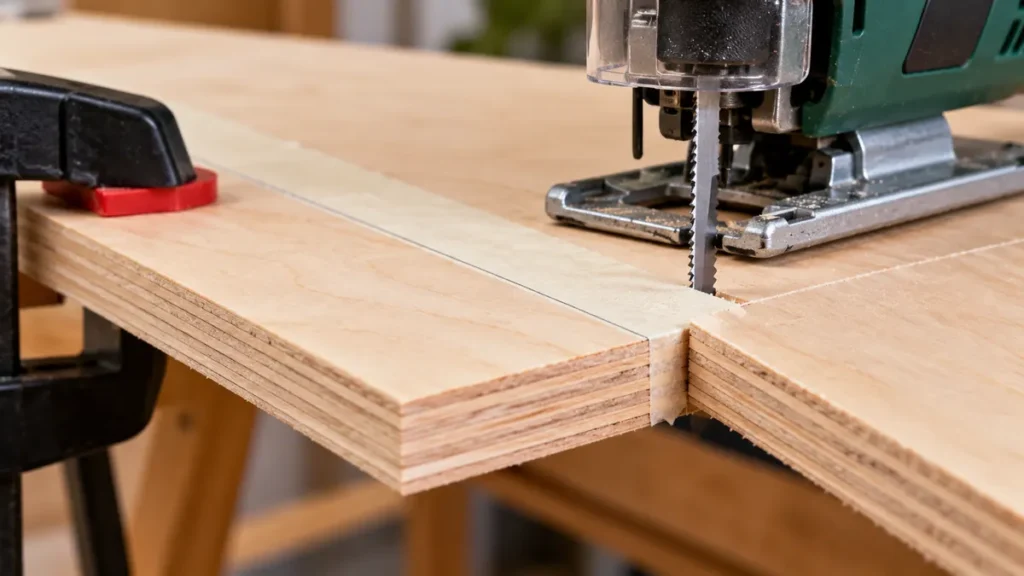
Clean jigsaw cuts in plywood depend on controlling where the blade teeth exit the face veneer. Use a sharp, plywood-suitable blade, orient the finished face according to the blade’s tooth direction, support the sheet close to the cut, and use little or no orbital action. Keep the baseplate flat and guide the saw at a steady rate without forcing it. These measures can greatly reduce tear-out, although no setup can guarantee a completely splinter-free edge in every plywood grade.
Most conventional wood-cutting jigsaw blades have upward-pointing teeth. They cut primarily on the upstroke, so they tend to splinter the upper surface nearest the jigsaw. With this blade type, place the better face down. A reverse-tooth blade cuts in the opposite direction, making the lower surface more vulnerable, so the better face generally goes up. Always confirm the tooth direction and application printed on the blade or its packaging.
For the blade choice, compare jigsaw blades intended for plywood and match the tooth direction to the face you want to protect.
What You Need for a Clean Plywood Cut
- A corded or cordless jigsaw in safe operating condition
- A compatible blade intended for clean cuts in wood or plywood
- Clamps and a stable work surface
- A straightedge or guide for straight cuts, if needed
- Painter’s tape for surface protection and line visibility, if helpful
- A sharp utility knife and straightedge for optional veneer scoring
- A model-compatible splinter guard, if available
- Eye protection, hearing protection, and suitable dust protection
Check the jigsaw manual before installing a blade or changing operating controls. Blade shank compatibility and clamp designs vary. A T-shank or U-shank blade must match the tool’s blade holder as well as the cutting application.
If you also need a saw, compare these jigsaws for plywood cutouts for controls, guidance and shoe protection.
How to Cut Plywood With a Jigsaw Without Splintering
-
Identify the finished face and blade direction. Examine the teeth before positioning the plywood. Place the finished face down for a conventional up-cutting blade. Place it up for a reverse-tooth blade. If the blade uses another tooth arrangement, follow its manufacturer’s surface-orientation guidance.
-
Mark the cut clearly. Use a pencil or another marking method that will not permanently damage the veneer. Painter’s tape over the cutting area can make a pencil line easier to see on dark plywood and may help hold loose surface fibers in place.
-
Score the vulnerable veneer if the edge must be especially clean. Place a straightedge along a straight cutting line and lightly score the face veneer with a sharp utility knife. Keep the scoring cut on the intended line and keep your free hand out of the knife’s path. Scoring is less practical on tight curves.
-
Support and clamp the plywood. Rest the sheet on a stable work surface with clearance below the blade path. Support both the retained piece and the waste section close to the cut. Arrange the supports so the blade cannot contact a bench, sawhorse, clamp, or floor. Secure the plywood against movement.
-
Disconnect power and install the blade. Unplug a corded jigsaw or remove the cordless tool’s battery where the manufacturer instructs before changing the blade. Install a sharp, compatible blade and confirm that it is fully secured. Its usable cutting length must provide clearance beneath the plywood throughout the stroke.
-
Reduce or disable orbital action. Aggressive orbital movement can cut wood faster, but it usually makes the blade action rougher at the veneer. Select straight reciprocating action or a low orbital setting according to the jigsaw and blade instructions. Selector positions are not standardized across manufacturers.
-
Set an appropriate speed. Follow the blade and jigsaw guidance rather than relying on one setting for every plywood panel. A consistent blade stroke generally produces a cleaner edge than hesitant starting and stopping. Excessive feed pressure can bend the blade and damage the veneer regardless of the speed setting.
-
Start with the blade clear of the plywood. Set the front of the baseplate flat on the sheet while keeping the blade away from the edge. Start the jigsaw and let it reach the selected operating speed before feeding the blade into the material. For an internal cutout, use a properly sized starter hole that provides blade clearance.
-
Guide the saw steadily. Keep the baseplate firmly against the plywood and move forward at a controlled rate. Let the teeth do the cutting. Do not push sideways against the blade to correct a wandering cut. Pause the forward feed while keeping the saw stable if the blade begins to labor.
-
Support the waste as the cut finishes. Prevent the offcut or cutout from breaking away and tearing the final section of veneer. Do not place a hand beneath the workpiece or near the blade. After completing the cut, release the switch and wait for the blade to stop before lifting or setting down the jigsaw.
Choose the Blade by Tooth Direction and Cut Type
A blade labeled for clean wood or plywood cutting is generally a better choice than an aggressive, coarse wood blade. Fine tooth spacing can leave a smoother veneer edge, but tooth count alone does not determine cut quality. Tooth direction, geometry, set, blade stiffness, sharpness, and suitability for the panel thickness all matter.
| Blade Configuration | Primary Cutting Direction | Surface Usually More Vulnerable | Typical Finished-Face Position |
|---|---|---|---|
| Conventional upward-pointing teeth | Upstroke | Top surface near the jigsaw | Face down |
| Reverse downward-pointing teeth | Downstroke | Bottom surface | Face up |
| Special clean-cut or bidirectional geometry | Depends on blade design | Depends on blade design | Follow blade instructions |
Reverse-tooth blades provide better visibility of a face-up cutting line, but their downward cutting action can create a reaction that makes firm baseplate contact especially important. Use the blade only as directed by its manufacturer and maintain stable control of the tool.
Blade width also affects the cut. A wider, stiffer blade generally tracks straight lines more effectively, while a narrower blade can follow tighter curves. Narrow blades are more prone to deflection if pushed too hard. The blade’s working length must suit the plywood thickness and leave adequate clearance through the full stroke.
Use Tape, Scoring, and Splinter Guards Correctly
Painter’s Tape
Painter’s tape can protect the surface from light baseplate scuffing and help prevent loose veneer fibers from lifting. Apply it over the cut area, mark the line on the tape, and press the tape down firmly. Remove it slowly after cutting, pulling it back over itself rather than sharply away from the veneer.
Tape cannot correct a dull blade, aggressive orbital action, or poor support. Test the tape on scrap if the plywood has a delicate finish because adhesion varies.
Scoring the Face Veneer
A shallow knife score severs surface fibers before the jigsaw reaches them. This method works best on straight cuts made against a straightedge. The saw kerf must remain on the waste side of the finished edge while still removing the scored boundary. An inaccurate score may remain visible on the retained piece.
Splinter Guards and Zero-Clearance Inserts
A splinter guard supports veneer fibers close to the blade. Some jigsaws accept a manufacturer-specific insert that fits into or beneath the baseplate. Compatibility varies by model, and a guard may restrict certain bevel cuts or blade configurations. Use only an accessory approved for the jigsaw and installed according to its instructions.
Compare model-matched jigsaw splinter inserts when the saw supports an insert around the blade opening.
Support the Plywood Without Pinching the Blade
Poor support can cause vibration, veneer fracture, and blade binding. Place supports close enough to the cutting path to limit flex while leaving the blade unobstructed. The kerf must remain open as the cut advances. If the two sections sag toward each other, they can pinch the blade.
For a large sheet, rigid foam insulation is sometimes used as a sacrificial support beneath the panel. This approach requires enough blade clearance to avoid contacting the floor or another hidden surface. Confirm that cutting the support material is compatible with the work area, blade, and dust-control plan.
Internal cutouts need support near completion. A loose center section can drop, bind the blade, or tear the remaining veneer. Clamp or otherwise control the cutout without putting hands in the blade path.
Keep Straight and Curved Cuts Under Control
Straight Cuts
A clamped straightedge can guide the side of the baseplate. Measure the offset between the blade and the relevant baseplate edge, then position the guide accordingly. Verify that the guide does not block the motor housing or controls.
A straightedge controls the tool’s surface path, but it cannot eliminate blade deflection beneath the sheet. Use a suitable stiff blade, keep the shoe flat, and reduce feed pressure if the lower edge drifts. A circular saw with an appropriate blade may be more suitable for long, highly precise straight cuts.
For a longer straight layout, follow the setup for setting up a supported straight jigsaw cut.
Curved Cuts
Choose a blade whose width and intended turning capability suit the curve. Feed slowly enough for the blade to follow the line without twisting. For a tight concave profile, relief cuts into the waste can give the waste material room to separate as the jigsaw turns. Do not force the blade sideways through a radius it cannot follow.
Why Plywood Still Splinters
- The finished face is oriented incorrectly. Tear-out usually appears where the teeth exit the veneer.
- The blade is dull or damaged. Worn teeth crush and pull fibers instead of cutting them cleanly.
- The blade is too aggressive. Coarse tooth geometry and strong orbital action can increase tear-out.
- The feed pressure is excessive. Forcing the saw promotes vibration, blade deflection, and rough edges.
- The panel is poorly supported. Flexing plywood vibrates around the kerf and may fracture near the end of the cut.
- The veneer is thin, brittle, or already loose. Plywood quality and surface condition affect the result.
- The offcut breaks away. An unsupported waste piece can pull veneer from the retained edge as the cut ends.
If splintering appears on both faces, replace a worn blade, check blade installation, reduce orbital action, and improve support. Make a test cut in scrap from the same panel before cutting a visible project component.
Safety and Dust Control
Inspect the cutting path for screws, nails, staples, and other hidden objects before starting. Keep hands clear of the marked path and the area beneath the plywood. Manage a power cord so it cannot cross the blade path, and never reach under the panel while the jigsaw is operating.
Plywood cutting produces wood dust and may also release dust from adhesives or surface coatings. Use suitable eye, hearing, and respiratory protection based on the material information and work environment. A jigsaw’s dust blower clears debris from the line but does not collect airborne dust. A compatible extraction connection can help, though it will not capture every particle.
Disconnect the power source before inspecting the blade, clearing debris near moving parts, or changing an accessory. A recently used blade may be hot, so allow it to cool before handling it.
Clean Cuts Start With the Exit Surface
The central rule is simple: protect the face where the blade teeth exit. Put the finished face down with a conventional up-cutting blade and up with a reverse-tooth blade, unless the blade manufacturer specifies a different orientation. Combine that setup with a sharp clean-cut blade, low orbital action, close workpiece support, steady feed pressure, and controlled support at the end of the cut. Tape, scoring, and a compatible splinter guard can refine the edge, but the blade and cutting technique have the greatest influence on tear-out.
